

Resources
- FLARE-VM & REMnux : https://medium.com/@AishaBB/building-a-secure-malware-analysis-lab-a-complete-guide-to-flare-vm-remnux-and-inetsim-e99c6752e668
Commands
- Setup
- Flare Vm
# Disable Windows Defenses Set-MpPreference -DisableRealtimeMonitoring $true Set-MpPreference -DisableIOAVProtection $true Set-MpPreference -DisableBehaviorMonitoring $true Set-MpPreference -DisableScriptScanning $true Set-MpPreference -DisableArchiveScanning $true Set-MpPreference -DisableIntrusionPreventionSystem $true # Create the Terminal Services policy key if it doesn't already exist New-Item -Path "HKLM:\SOFTWARE\Policies\Microsoft\Windows NT\Terminal Services" -Force -ErrorAction SilentlyContinue | Out-Null # Block Drive Sharing (Prevents ransomware from escaping the VM to encrypt your physical host) Set-ItemProperty -Path "HKLM:\SOFTWARE\Policies\Microsoft\Windows NT\Terminal Services" -Name "fDisableCdm" -Value 1 -Force # Block Clipboard (Prevents malware from stealing passwords or data copied on your physical host) Set-ItemProperty -Path "HKLM:\SOFTWARE\Policies\Microsoft\Windows NT\Terminal Services" -Name "fDisableClip" -Value 1 -Force # Block Printers & COM Ports (Closes peripheral escape routes that malware can use to traverse networks) Set-ItemProperty -Path "HKLM:\SOFTWARE\Policies\Microsoft\Windows NT\Terminal Services" -Name "fDisablePNPRedir" -Value 1 -Force Set-ItemProperty -Path "HKLM:\SOFTWARE\Policies\Microsoft\Windows NT\Terminal Services" -Name "fDisableLPTComPortRedir" -Value 1 -Force (New-Object net.webclient).DownloadFile('https://raw.githubusercontent.com/mandiant/flare-vm/main/install.ps1', "$([Environment]::GetFolderPath('Desktop'))\install.ps1") Unblock-File .\install.ps1 Set-ExecutionPolicy Bypass -Scope Process -Force .\install.ps1 - REMnux
# Enable Graphical Login Compatibility sudo -s nano /etc/gdm3/custom.conf WaylandEnable=false # UnComment AutomaticLoginEnable = true #Commnet AutomaticLogin = remnux # Comment reboot # RDP [ Log out of the Proxmox web console desktop before attempting your RDP connection ] sudo apt update sudo apt install xrdp -y sudo adduser xrdp ssl-cert sudo systemctl enable --now xrdp sudo systemctl status xrdp # Adapters ip a # Get the adapters names sudo nano /etc/netplan/50-cloud-init.yaml # maybe not the same file name sudo netplan apply # Update remnux upgrade- Tunnel to Flare
apt install socat
sudo nano /etc/systemd/system/rdp-bridge.service


# Change the IP and read this https://unix.stackexchange.com/questions/506347/why-do-most-systemd-examples-contain-wantedby-multi-user-target
[Unit]
Description=RDP Bridge to Windows Lab
After=network.target

[Service]
ExecStart=/usr/bin/socat TCP-LISTEN:33389,fork,reuseaddr TCP:192.168.99.20:3389
Restart=always
RestartSec=5

[Install]
WantedBy=multi-user.target


sudo systemctl daemon-reload
sudo systemctl enable --now rdp-bridge
sudo systemctl status rdp-bridge
- Tunnel to Flare
- Inetsim
accept-all-ips start ens19
echo 1 | sudo tee /proc/sys/net/ipv4/ip_forward

sudo nano /etc/sysctl.conf
net.ipv4.ip_forward=1 # Uncomment

sudo sysctl -p # just ensure

sudo  iptables -t nat -A POSTROUTING -o ens18 -j MASQUERADE
sudo iptables -A FORWARD -i ens19 -o ens18 -j ACCEPT

nano /etc/inetsim/inetsim.conf
	start_service dns
	start_service http
	start_service https
	start_service smtp
	start_service smtps
	start_service pop3
	start_service pop3s
	start_service ftp
	start_service ftps
	service_bind_address            192.168.99.16

sudo systemctl restart inetsim        # apply config changes
sudo systemctl enable  inetsim         # start on boot
sudo systemctl status  inetsim --no-pager

sudo ss -tulnp | grep ":53\b"
nslookup google.com 192.168.99.16      # expect Address: 127.0.0.1 (fake answer)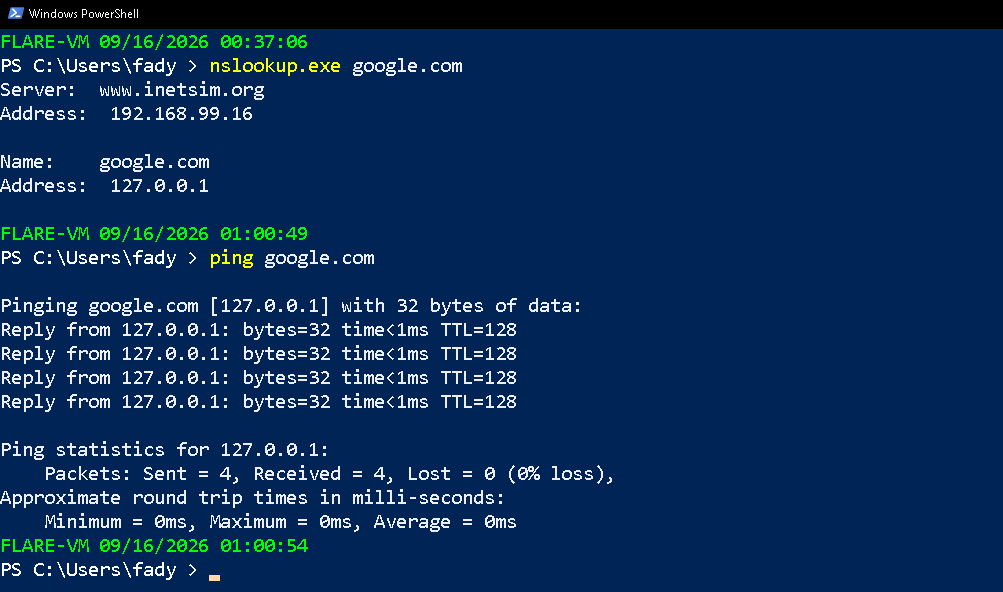
- Flare Vm
Tools
- Flare-Vm : https://github.com/mandiant/flare-vm
- Remnux : https://remnux.org/
- inetsim : https://www.inetsim.org/