The goal of a red team is to achieve an operational objective that has been pre-agreed with the client. This will vary between clients, but will often entail gaining access to business-critical systems or data. It should not be generic, such as “get domain admin”. One valuable outcome of a red team assessment is a clear indication of business risk by demonstrating the impact of compromise. Gaining access to a domain admin user (or the user of a privileged group) may be a stepping stone in achieving the operational objective, but it should not be the objective itself.
A phishing attack leading to compromise is NOT the fault of an end-user but rather, insufficient security controls of a target environment. End-users are often blamed for compromise due to a phishing attack. Security defenses are not intended to hinge on a user’s click decision to click or not. If a user who falls victim to a phishing attack leads to system-wide compromise, that user already had the potential to elevate privileges or otherwise compromise the environment.
Log everything; You never know what you need.
Red Team engagements focus on specific goals and objectives , Red Team must operate within its rules and boundaries and focus on goals outlined in the engagement plan.
The goal is not to prove that you can ‘hack’ into the system but to understand what “Is” vs. “Should Be.”
Do's and Don'ts
DO:
Log Everything: Maintain strict timestamps and C2 logs. It is your only defense during deconfliction if the client blames you for a network outage.
Understand Your Artifacts: Never run a tool if you don’t know exactly what registry keys, memory pages, or network traffic it generates.
Situational Awareness: Map the host processes and EDR drivers the second a payload executes before taking offensive action.
DON’T:
Run Pre-compiled GitHub Junk: Always read the source code and compile it yourself to avoid backdoors and system crashes.
Use Plaintext C2: Never transmit credentials or commands over unencrypted channels.
Steal Real PII/PCI Data: Capture non-sensitive Proof of Access (like a directory listing). Actually exfiltrating restricted data creates a legal breach.
Turn Off Antivirus: Bypass security controls in memory; never permanently disable a client’s defenses and leave them exposed to real threat actors.
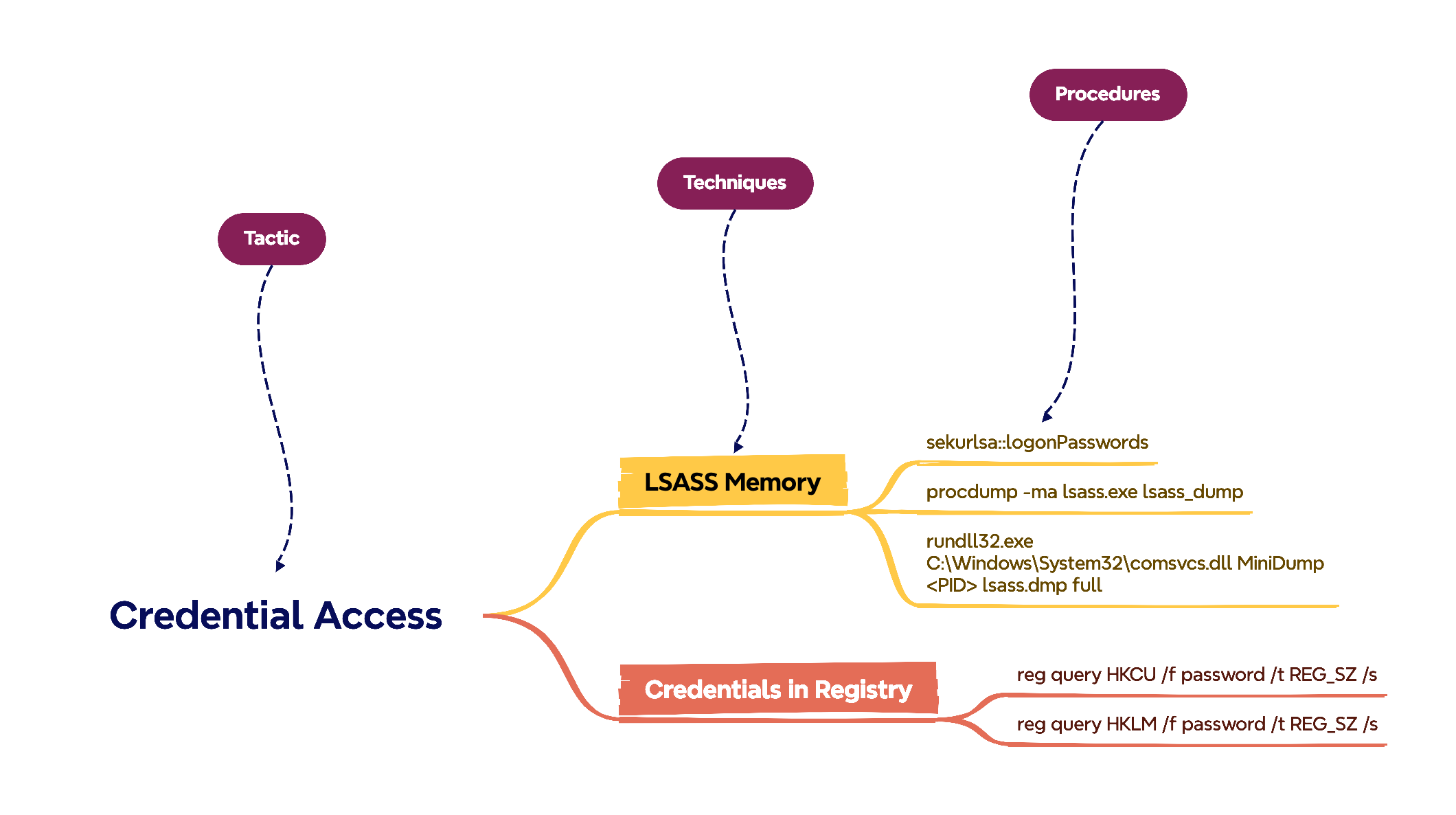
Tactics, Techniques, and Procedures (TTPs)
TTPs describe the why, the how, and the exact steps an adversary takes to achieve their operational objective. They form the foundational structure of threat emulation and frameworks like MITRE ATT&CK.
1. Tactics (The “Why”)
The overarching tactical goal or reason for performing an action. Adversaries chain multiple tactics together to progress through an attack lifecycle.
The method or mechanism used to accomplish a specific tactic. There are often dozens of different techniques to achieve a single tactical goal.
Example (Credential Access): Dumping credentials directly from memory vs. searching for cleartext passwords in the Windows Registry or configuration files.
3. Procedures (The “Exact Steps”)
The precise step-by-step execution or specific software implementation of a technique.
Example (Memory Dumping): Using Mimikatz vs. dumping the lsass.exe process via Task Manager or comsvcs.dll.
The Operator's Takeaway Procedures (like blocking the string mimikatz.exe). Professional Red Teams force defenses to evolve by changing procedures while maintaining realistic adversary Techniques and Tactics.
Blue Teams can easily write signatures for specific
Adversary Emulation vs. Simulation
While both approaches test organizational defenses, they serve entirely different strategic purposes during an engagement.
Feature
Adversary Emulation
Adversary Simulation
The Threat
A specific, known threat actor (e.g., FIN7, APT29).
A hypothetical, advanced threat.
The TTPs
Strictly mirrors known TTPs derived from Threat Intelligence.
Unrestricted; leverages custom, unique, or undocumented TTPs.
The Goal
Test if defenses can detect a highly likely, specific adversary.
Evaluate broad capabilities and uncover unknown security blind spots.
Scope
Narrow and highly focused.
Broad and creative.
OPSEC Priority
Lower (the goal is to see if the Blue Team catches the known indicators).
Extremely High (the goal is to achieve the objective completely unseen).
The Engineering Translation Emulation. Writing a custom C/MASM loader from scratch to bypass an undocumented EDR hook is Simulation.
Configuring a Cobalt Strike Team Server with a Malleable C2 profile pulled straight from a Mandiant report is
Cyber Attack Lifecycles & Frameworks
Attack frameworks structure the phases of an intrusion, allowing operators to plan campaigns and defensive teams to map detection coverage.
1. Lockheed Martin Cyber Kill Chain (Linear)
Reconnaissance: Scouting target infrastructure and employees.
Weaponisation: Creating the payload (e.g., coupling malware with an exploit).
Delivery: Sending the payload to the target (e.g., spear-phishing).
Exploitation: Executing code on the target system.
Installation: Establishing a backdoor on the compromise point.
Command & Control (C2): Opening a channel for remote administration.
Actions on Objectives: Executing the ultimate goal (exfiltration, destruction).
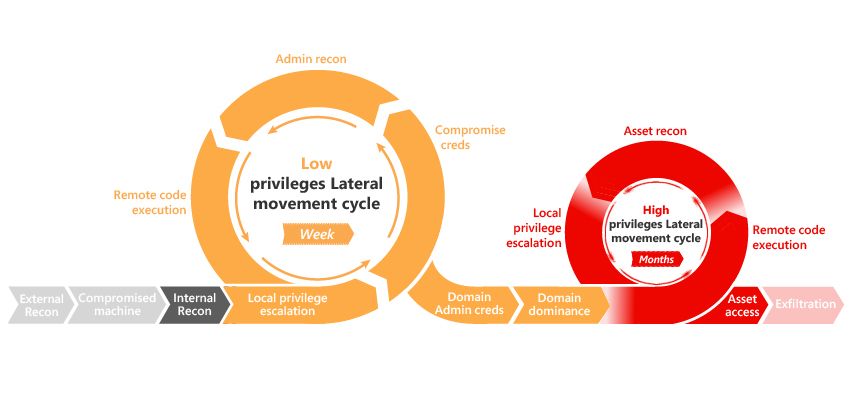
The Internal Loop:Escalate Privileges→Internal Reconnaissance→Move Laterally→Maintain Presence
Complete Mission
3. MITRE ATT&CK Matrix (Behavioral Taxonomy)
Replaces fixed sequences with a matrix of Tactics (Goals) and Techniques (Actions).
Documents granular TTPs for post-compromise actions across modern enterprise platforms (Windows, Linux, Active Directory, Cloud).
Operational Takeaway Mandiant's model to understand campaign flow, MITRE ATT&CK to select specific techniques during execution, and the Cyber Kill Chain when explaining high-level intrusion paths to executive stakeholders.
Use
Red Teaming Scenario Types: How They Compare
Type
Real attack?
Technical?
Physical?
Human?
Scope
Realism
Tabletop
No
No
No
Discussion only
Narrow (discussion)
Low
Physical
Yes
No
Yes
Sometimes
Narrow (physical)
Medium
Human
Yes
No
Sometimes
Yes
Narrow (social)
Medium
Cyber exercise
Yes
Yes
No
Sometimes
Medium (Red vs. Blue)
Medium - High
Full-scale
Yes
Yes
Yes
Yes
Broad (all domains)
Highest
MTTD and MTTR in Adversarial Exercises
What is MTTD?
Mean Time to Detect = the average time it takes for an organization to notice that a breach or malicious activity is happening.
How it is calculated
For each individual breach/incident in the exercise:
Time to Detect = Time of Detection minus Time of Initial Compromise
Then you average those values across all incidents:
MTTD = (T1 + T2 + T3 + ... + Tn) / n
Example
During a red team exercise, three separate attacks are launched:
But the undetected incident is even more important: it means the attacker achieved their objective without ever being noticed.
Why it matters
A long MTTD is a window of opportunity for the attacker. The longer they go undetected, the more they can do: steal data, install backdoors, escalate privileges, move laterally.
Industry benchmarks: The median time to detect a real breach is often measured in weeks or months, not hours. IBM’s “Cost of a Data Breach” report typically shows MTTD in the range of 200+ days for real incidents.
MTTD measures detection capability: whether your EDR, SIEM, SOC analysts, and alerting rules actually work.
What is MTTR?
Mean Time to Recover = the average time it takes to restore normal operations after a breach is detected.
There are actually two common definitions, and both are useful:
Definition 1: Time to Recover/Remediate
Time to Recover = Time normal operations restored minus Time of Detection
This measures how long it takes to contain, eradicate, and recover after detection.
Definition 2: Time to Respond
Time to Respond = Time of first response action minus Time of Detection
This measures how quickly the team begins responding (isolating hosts, disabling accounts, etc.).
Example
Incident
Detected
Fully recovered
Time to Recover
Credential theft
09:45
12:00
2h 15m
Lateral movement
14:30
18:00
3h 30m
Data exfiltration
Never detected
Never recovered
N/A (undetected)
MTTR = (2h 15m + 3h 30m) / 2 = 2h 52m
Why it matters
MTTR measures resilience: how fast you can bounce back after an incident.
It includes containment (stopping the spread), eradication (removing the attacker), and recovery (restoring services).
A long MTTR means the attacker has more time to cause damage, or the business stays disrupted longer.
Why the Phrase Says “from Individual Breaches”
This is the key part. The phrase emphasizes that MTTD and MTTR are not single numbers; they are aggregates computed from individual incidents.
Each breach is measured separately
Breach type
MTTD
MTTR
Phishing based credential theft
45 min
2h 15m
Lateral movement
4 hours
3h 30m
Ransomware
10 min
48 hours
Data exfiltration
Never detected
Never recovered
By measuring each one, you learn:
Which attack types are detected fastest (e.g., ransomware triggers immediate alerts, but lateral movement goes unnoticed).
Which attack types take longest to recover from (e.g., ransomware takes days to restore from backups, but credential theft is resolved in hours).
Which attacks are never detected at all, which is the most dangerous category.
Then you aggregate
MTTD (overall) = average of all individual detection timesMTTR (overall) = average of all individual recovery times
But the individual numbers are often more actionable than the average. An overall MTTD of 2 hours sounds fine until you realize that one of the three attacks was never detected at all. The average hides the worst case.
How Adversarial Exercises Produce These Metrics
During a cyber exercise or full-scale operation, the red team controls the attack, and the blue team defends. Because the exercise is instrumented (logged, timed, observed by a white team), you can measure:
Metric
What you measure
Where it comes from
MTTD
Time from red team’s first action to blue team’s first detection
SIEM alerts, EDR detections, SOC ticket timestamps, white team observations
MTTR
Time from detection to containment/recovery
Incident response logs, system restoration timestamps, SOC playbook completion
Without exercises, you can’t measure these
Real breaches are rare; you can’t wait for one to happen to find out your MTTD.
Tabletop exercises don’t produce real timestamps (they are discussions, not measurements).
Vulnerability scans don’t measure detection or response; they measure configuration, not capability.
Only live adversarial exercises (where an actual attack is simulated and an actual defense is mounted) produce real, measurable MTTD and MTTR data.
Why This Matters
Metric
What it tells you
What it doesn’t tell you
MTTD
How fast you notice an attack
Whether you can stop it
MTTR
How fast you recover after detecting
Whether the attacker was fully evicted
Both
Your overall operational readiness
Your preventive controls (that is a different metric)
The real insight
An organization might have:
Excellent prevention (firewalls, patching, MFA) but poor MTTD (attacks that get through go unnoticed for weeks).
Fast detection but slow MTTR (they see the attack but can’t contain it).
Good averages but one catastrophic outlier (e.g., ransomware takes 48 hours to recover, while everything else is fast).
Measuring MTTD and MTTR from individual breaches reveals these patterns. It tells you where to invest: better detection tooling, faster response playbooks, more SOC staff, automated containment, etc.
TL;DR
Term
Meaning
Formula
MTTD
Mean Time to Detect: average time to notice a breach
avg(Detection Time minus Compromise Time) across incidents
MTTR
Mean Time to Recover: average time to restore operations after detection
avg(Recovery Time minus Detection Time) across incidents
”From individual breaches”
Each incident is measured separately, then averaged
Reveals which attack types are detected fast/slow, recovered fast/slow, or never detected at all