
Resources
- ntdoc : https://ntdoc.m417z.com/
- vergiliusproject : https://www.vergiliusproject.com/
- By Usta0x001 : https://medium.com/@Usta0x001/deep-dive-into-windows-architecture-88f429e8843e
- Windows Subsystems : https://library.mosse-institute.com/articles/2022/12/windows-internals-subsystems.html
- Smss.exe : https://www.reddit.com/r/windows/comments/yw5jm1/have_you_ever_asked_yourself_what_is_smssexe/
- Dispatchers : https://www.ired.team/miscellaneous-reversing-forensics/windows-kernel-internals/glimpse-into-ssdt-in-windows-x64-kernel
- Thread Pools : https://scorpiosoftware.net/2022/03/21/threads-threads-and-more-threads/ || https://yunolay.com/windows-thread-pools/
- Enable Kernal Debugging : https://trainsec.net/library/windows-internals/kernel-debugging-windows-vms-a-practical-walk-through/
- Handles : https://osm.hpi.de/bsArch/2006/Slides/Unit02/2.2_Win-CoreSysMechanisms.pdf
- Data Execution Prevention : https://vickieli.dev/binary%20exploitation/data-execution-prevention/ || https://fluidattacks.com/blog/understanding-dep
- ASLR : https://securitymaven.medium.com/demystifying-aslr-understanding-exploiting-and-defending-against-memory-randomization-4dd8fe648345
- SSDT : https://www.ired.team/miscellaneous-reversing-forensics/windows-kernel-internals/glimpse-into-ssdt-in-windows-x64-kernel
- WinApi : https://web.archive.org/web/20250604185044/https://sensei-infosec.netlify.app/forensics/windows/api-calls/2020/04/29/win-api-calls-1.html || https://medium.com/@oladeledamilola643/what-is-the-windows-api-897a99df337b
- Object Management : https://usta0x001.gitbook.io/posts/fundamentals/windows-internals/object-management || https://medium.com/@andreabocchetti88/analyze-a-kernel-object-using-the-windbg-debugger-aa82753edbee
- Sesssions : https://trainsec.net/library/windows-internals/inside-windows-sessions/ || https://brianbondy.com/blog/100/understanding-windows-at-a-deeper-level-sessions-window-stations-and-desktops
- Memory Compression : https://woshub.com/memory-compression-process-high-usage-windows-10/
- System Error Code List : https://learn.microsoft.com/en-us/windows/win32/debug/system-error-codes—0-499- || https://learn.microsoft.com/en-us/openspecs/windows_protocols/ms-erref/596a1078-e883-4972-9bbc-49e60bebca55
- Macros : https://learn.microsoft.com/en-us/cpp/preprocessor/macros-c-cpp
- Process
- ExitProcess vs TerminateProcess : https://stackoverflow.com/questions/55063923/does-a-windows-process-need-to-be-terminated-by-exitproces-or-terminateprocess
- E_Process vs K_Process : https://yunolay.com/processes-and-the-eprocess-structure/
- Doubly-Linked List : https://medium.com/@s12deff/linked-lists-in-windows-kernel-driver-5a89b6219347
- Process Creation : https://medium.com/windows-os-internals/windows-internals-process-management-part-1-999b898443a4
- DLL Search Order : https://stmxcsr.com/dll-search-order.html
- API sets : https://bookkity.com/article/api-sets || https://apisets.info/apisetschemas/10.0.19041.1-amd64/
- Explicit Linking vs. Implicit Linking : https://www.ni.com/en/support/documentation/supplemental/09/calling-a-dll-in-labwindows—cvi---explicit-linking-vs—implicit.html
- CreateProcessA : https://medium.com/@theCTIGuy/windows-api-highlight-createprocess-ec1ec0915b9c
- Zombie Process : https://scorpiosoftware.net/2022/05/14/zombie-processes/
- Protected Process :
- https://medium.com/@boutnaru/the-windows-security-journey-protected-processes-6451a5fff277
- Protected Process Light : https://medium.com/@boutnaru/the-windows-security-journey-ppl-protected-processes-light-831d5f371004 || https://itm4n.github.io/lsass-runasppl/ || https://www.bordergate.co.uk/process-protection-light/
Commands
- Kernal Debugging
- Proxmox
- Proxmox Shell
# 1. Set the VM to UEFI without Secure Boot qm set 127 -bios ovmf qm set 127 -efidisk0 local-lvm:1,efitype=4m,pre-enrolled-keys=0 # 2. Verify network is on vmbr0 qm set 127 -net0 e1000,bridge=vmbr0 # 3. Disable Proxmox firewall for the lab echo "[OPTIONS]" > /etc/pve/firewall/cluster.fw echo "enable: 0" >> /etc/pve/firewall/cluster.fw # 4. Reboot qm reboot 127 - debuggee
:: 1. Configure KDNET kdnet.exe 1.2.3.4 192.168.99.17 50000 :: 2. Enable at boot bcdedit /debug on bcdedit /dbgsettings net hostip:192.168.99.17 port:50000 key:1.2.3.4 :: 3. Allow the port netsh advfirewall firewall add rule name="KDNET" dir=in action=allow protocol=UDP localport=50000 :: 4. Reboot shutdown /r /t 0 - debugger
windbg.exe -k net:port=50000,key=1.2.3.4
- Proxmox Shell
- Proxmox
Tools
- sysinternals : https://live.sysinternals.com/
- TotalPE2 : https://github.com/zodiacon/TotalPE2
- Zodiacon : https://github.com/zodiacon/AllTools
- ntdoc : https://ntdoc.m417z.com/
- HelpViwer : https://learn.microsoft.com/en-us/visualstudio/help-viewer/installation?view=vs-2022
- HxD : https://mh-nexus.de/
Notes
General
Process Types & Lifecycles
- Win32 (Legacy Desktop): Traditional apps (e.g., Steam, cmd.exe) run indefinitely in the background. The OS trusts them to manage their own resources.
- UWP (Modern Windows): Sandboxed apps (e.g., Calculator). When minimized, the Windows Kernel steps in and Suspends them dropping CPU to 0% and paging their memory to save battery.
- Parent/Child Independence: Processes are completely independent. If Process A (Parent) spawns Process B (Child), and Process A is killed, Process B becomes an “orphan” and keeps running perfectly fine. (Highly abused in malware droppers).
- PID Reuse: Process IDs (PIDs) are random numbers assigned for the lifespan of a process. Once it dies, the OS aggressively reuses that PID for new programs. Never hardcode PIDs.
Memory Metrics
- Commit Size (Credit Limit): Total virtual memory the OS has promised/reserved for the app. The app isn’t necessarily using this much physical RAM yet.
- Private Working Set (Cash Withdrawn): The actual, physical RAM hardware currently held exclusively by the app.
- Active Private Working Set (UWP Only): Because UWP apps compress memory when suspended, this metric shows the physical RAM the app is using right now while it is awake.
Service Hosts (
svchost.exe)
- What it is: A generic Windows process designed to host services built as DLLs (since DLLs cannot execute themselves).
- The Architecture Shift: In older Windows, multiple services shared a single
svchost.exeto save RAM. In modern Windows 10/11 (with >3.5GB RAM), every service gets its own isolatedsvchost.exe. If one crashes, the others survive.- Offensive Note: Because modern Windows runs 70+
svchost.exeprocesses asSYSTEM, it is the ultimate camouflage. It is the #1 target for malware process injection.Handles & Kernel Objects
- The Barrier: User-Mode apps (Ring 3) are physically blocked from touching Kernel-Mode (Ring 0) resources (Files, Network Sockets, Threads).
- How Handles Work: When an app asks to open a file, the Kernel creates a “Kernel Object” in Ring 0. The Kernel then adds a row to the process’s private Handle Table. This row contains a pointer to the real object and the app’s Access Rights (e.g., Read/Write).
- The Handle: The Kernel passes the Index Number of that row (e.g.,
0x04) back to the User-Mode app. The app simply tells the Kernel: “Write data to index 0x04”. The User-Mode app never actually touches the file directly.- Handle Leaks: A severe bug where a program opens resources (getting a handle) but forgets to call
CloseHandle(). The handle count continuously climbs until the Kernel’s tables are exhausted, crashing the app or blue-screening the OS.
- process don’t have stack but threads
- Every user-mode thread is born in ntdll not in the app.
Windows Versions
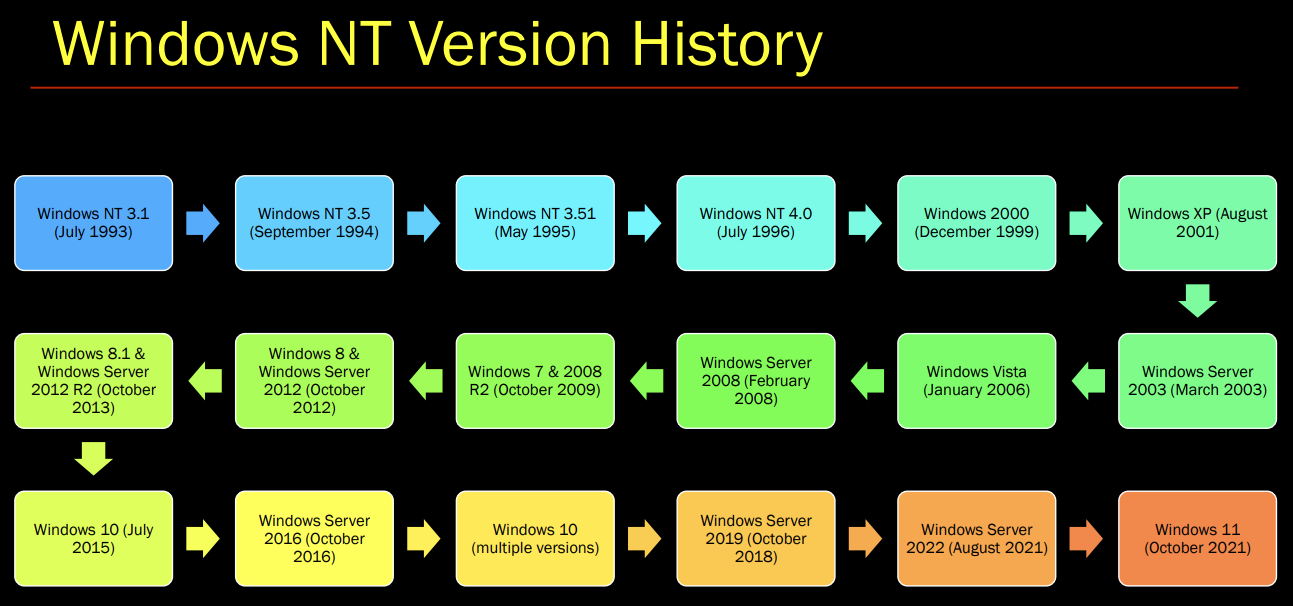
Windows NT Lineage (32 & 64 bit)
Windows 11 (2021) - MS Version 10.0 The current client version of Windows. It introduced a redesigned user interface, stricter hardware security requirements (such as TPM 2.0 and Secure Boot), and exclusively supports 64-bit processors, officially dropping 32-bit support.
Windows 10 (2015) - MS Version 6.4 / 10.0 The previous major client version of Windows. It was introduced as a unified platform across multiple devices and continuously updated under a “Windows as a Service” model.
Windows 8 / 8.1 (2012-2013) - MS Version 6.2 / 6.3 A client version of Windows that introduced a major, touch-optimized redesign (the Metro interface) and removed the traditional Start menu, which was later partially restored in 8.1.
Windows 7 (2009) - MS Version 6.1 A highly popular client version of Windows. Windows 7 greatly improved stability and user experience over Vista.
Windows Vista (2006) - MS Version 6.0 A client version of Windows that was widely criticized for its bugs and behavior. Windows Server 2008 was the server counterpart.
Windows XP (2001) - MS Version 5.1 A client version of Windows that has been widely used. Adding more security and administrative capabilities, XP became available in 64-bit versions for AMD x64 and Intel Itanium CPUs.
Windows 2000 (2000) - MS Version 5.0 Windows 2000 was an updated version of Windows NT 4.0 for client and server. It added numerous enhancements including Plug and Play and Active Directory. Windows 2000 came in one workstation and three server versions. Server versions supported 64-bit AMD x64 and Intel Itanium CPUs.
Windows NT (1993) - MS Versions 3.1, 3.5, 4.0 Windows NT 3.1 was a completely new 32-bit OS with separate client and server versions. Introduced during the reign of Windows 3.1 and two years before Windows 95, it used the same Program Manager user interface as Windows 3.1, but provided greater stability. In 1996, Windows NT 4.0 switched to the Windows 95 Start menu interface, but did not include Plug and Play. NT Server gained significant market share, while the NT Workstation client version was aimed at the professional user and not the Windows 95/98 market.
Windows 95 Lineage (32 bit)
Windows ME (2000) - MS Version 4.9 An upgrade to Windows 98. ME had a shorter boot time, but no longer could be booted into DOS only (DOS sessions could still be run in a Windows window).
Windows 98 (1998) - MS Version 4.1 Windows 98 was an upgrade to Windows 95 that tightly integrated the Internet Explorer Web browser with the OS. In 1999, Windows 98 Second Edition fixed numerous bugs and upgraded its applications.
Windows 95 (1995) - MS Version 4.0 Windows 95 was the first 32-bit Windows operating system and a major upgrade from Windows 3.1. It used an entirely different user interface that incorporated the now-common Start menu and Taskbar. It was also the first time the computer booted directly into Windows, rather than being loaded after booting up in DOS.
Windows DOS Lineage (16 bit)
Windows 3.x (1990-1992) - MS Version 3.x Windows 3.0 was the first popular version of Windows with a new, colorful user interface that was far superior to Windows 2.0. Although the PC still booted into DOS, Windows 3.0 included a DOS extender that broke the 2MB memory limit (a major breakthrough). Windows 3.0 was widely used to multitask DOS applications. Windows 3.1 (1992) was more stable and faster. It evolved into Windows for Workgroups (Version 3.11), which added peer-to-peer networking and was the last 16-bit Windows version.
Windows 2.0 / 286 / 386 (1987) - MS Version 2.0 Windows 2.0 introduced overlapping, resizable windows with more flexibility. Soon after, Windows/386 was released for Intel’s 386 CPU, which could run multiple DOS applications simultaneously (Windows 2.0 was renamed Windows/286). Windows was becoming more useful, and a handful of companies adopted it as an operating environment.
Windows 1.0 (1985) - MS Version 1.0 The first Windows version introduced the MS-DOS Executive, which was a DOS application that ran applications in side-by-side windows. It was rarely used.
Summary Table
OS Version Bits Intro Year Built-in Networking NT Lineage Windows 11 64 2021 Yes Windows 10 32/64 2015 Yes Windows 8 / 8.1 32/64 2012 Yes Windows 7 32/64 2009 Yes Windows Server 2008 32/64 2008 Yes Windows Vista 32/64 2006 Yes Windows Server 2003 32/64 2003 Yes Windows XP 32/64 2001 Yes Windows 2000 32 2000 Yes Windows NT 32 1993 Yes 95 Lineage Windows ME 32 2000 Yes Windows 98 32 1998 Yes Windows 95 32 1995 Yes DOS Lineage WfW 3.11 16 1992 Yes Windows 3.1 16 1992 No Windows 3.0 16 1990 No Windows/386 16 1987 No Windows 2.0 16 1987 No Windows 1.0 16 1985 No
Threads
If the Process is the factory building, the Thread is the actual worker inside that building. A process doesn’t actually “run” anything; the operating system Kernel only schedules threads to do the work.
What Every Thread Maintains:
- Entity scheduled by the kernel: The CPU only executes threads. The OS Kernel acts as the shift manager, deciding which thread gets to run on the physical CPU core at any given millisecond.
- State of CPU registers (The Clipboard): When a thread is paused (Context Switch), the OS takes a snapshot of the CPU’s hardware registers. This allows the thread to resume exactly where it left off without realizing it was paused.
- Current access mode (User vs. Kernel): Tracks the rulebook the thread is currently following. Is it running standard app code (User Mode / Ring 3), or did it ask the OS to do something restricted like reading a file (Kernel Mode / Ring 0)?
- Stack(s) (Short-term memory): Every thread gets its own private memory stack to keep track of function calls and local variables. (They actually get two: one for User Mode, one for Kernel Mode).
- Thread Local Storage / TLS (The Private Locker): While all threads share the massive global memory of the main Process, TLS is a tiny slice of memory dedicated only to this specific thread for its own private variables.
- Priority (The VIP Pass): Windows assigns every thread a priority number (0 to 31). If a high-priority thread needs to run, the Kernel will kick a lower-priority thread off the CPU.
- State (The Physical Status):
- Running: Actively executing code on the CPU core.
- Ready: Awake and waiting in line for a turn.
- Waiting: Frozen (sleeping) because it asked for a file or network data and is waiting for the hardware to deliver it.
- Optional security token (Impersonation): Threads usually just share the main Process’s security badge. However, a thread can temporarily hold a different badge (e.g., an Admin server thread downgrading to “Guest” to safely read a user’s file).
- Optional message queue & windows: If a thread creates a graphical window, the OS automatically hands it a Message Queue so it can catch and process your mouse clicks and keyboard presses.
User vs. Kernel Mode
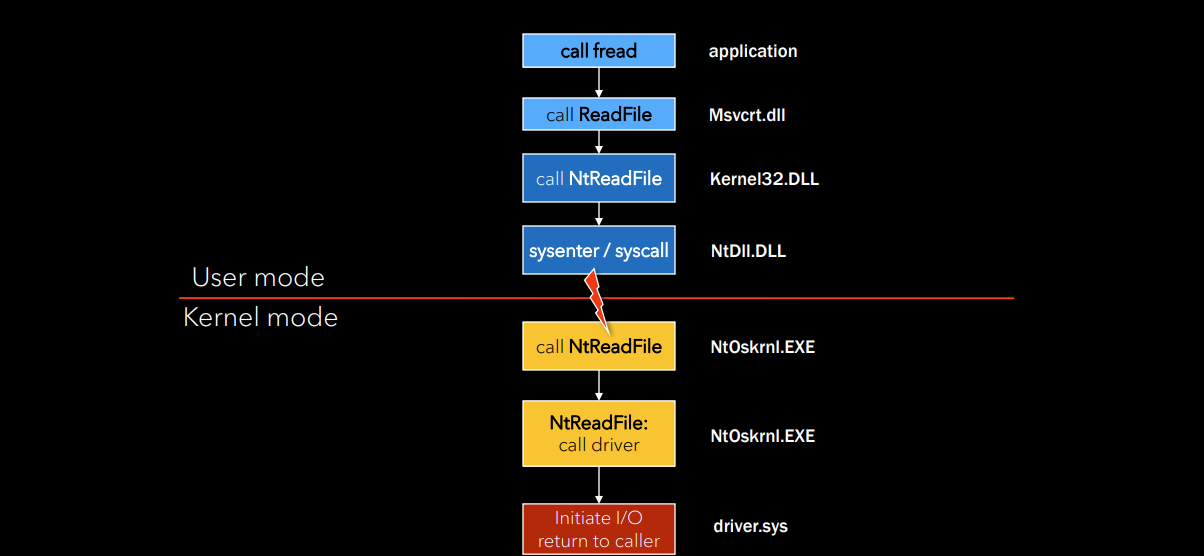
The fundamental blueprint of Windows separates safe, everyday applications from the dangerous, low-level engine of the operating system.
1. User Mode (Ring 3)
The “Sandbox.” Applications here cannot touch hardware directly. If they crash, only the app dies.
- User Processes: The apps you run (Chrome, Notepad, Steam).
- Service Processes: Background Windows services (e.g.,
svchost.exerunning updates or print spoolers).- System Processes: Core user-mode OS processes (e.g.,
winlogon.exefor login,lsass.exefor security).- Subsystem DLLs: Standard Windows APIs (
kernel32.dll,user32.dll). When an app needs OS resources, it calls these libraries first.- Subsystem (CSRSS.exe): The Client/Server Runtime Subsystem, which helps manage console windows and thread creation.
2. The Bridge (
NTDLL.DLL)
- This is the absolute lowest layer of User Mode and the bouncer to the Kernel.
- When a subsystem DLL needs hardware access, it passes the request to
NTDLL.DLL.NTDLLexecutes a Syscall (System Call), a special CPU instruction that suspends the thread, crosses the security boundary, and wakes it up inside Kernel Mode to do the heavy lifting.3. Kernel Mode (Ring 0)
The “VIP Area.” Code here has absolute, unrestricted access to the CPU, RAM, and hardware. If anything crashes here, the whole computer crashes (Blue Screen of Death).
- Executive: The upper layer containing the “Managers” (Memory Manager, I/O Manager, Security Reference Monitor) that enforce rules and handle high-level OS tasks.
- Kernel: The micro-manager that directly schedules threads onto physical CPU cores and handles hardware interrupts.
- Device Drivers: Code written by hardware manufacturers (NVIDIA, Intel) that teaches the Kernel how to talk to specific physical devices.
- Win32k.sys: The graphical engine. Rendering the Windows GUI (drawing windows, catching mouse clicks) is done in Kernel Mode for maximum speed.
4. The Metal Layer
- Hardware Abstraction Layer (HAL): (
hal.dll). Translates Kernel commands into specific motherboard/CPU electrical signals. This is why the same Windows Kernel can run on an Intel laptop or a custom AMD gaming rig without being rewritten.- Hyper-V Hypervisor (Ring -1): Sits completely underneath the Kernel. It manages the physical hardware and tricks the Windows Kernel into thinking it owns the machine, allowing Virtual Machines to run safely side-by-side.
Windows Subsystems
Environment Subsystems act as API translators in User Mode. They expose a specific set of rules (Windows, Linux, POSIX) to applications, and translate those requests into raw NT Kernel system calls.
- Win32 (
csrss.exe): The mandatory Windows subsystem. It handles the GUI, input, and standard Windows APIs. If it dies, the OS crashes.- WSL (Windows Subsystem for Linux): Allows native Linux binaries to run on Windows by translating Linux kernel calls or running a lightweight virtualization layer.
- Executable Subsystems (Console vs. GUI): A flag inside an
.exethat tells Windows whether to launch the app with a command prompt window (CONSOLE) or purely as a graphical interface (WINDOWS).flowchart TD subgraph UserMode ["User Mode (Ring 3)"] A["Application (app.exe)"] -->|"Calls WriteFile()"| B["Subsystem DLL (kernel32.dll / KernelBase.dll)"] B -->|"Validates parameters & translates to NtWriteFile()"| C["Native API (ntdll.dll)"] C -->|"Sets Syscall Number (SSN) & triggers syscall"| D["CPU Transition Barrier"] end subgraph KernelMode ["Kernel Mode (Ring 0)"] D -->|"Switches privilege level"| E["System Service Dispatcher (KiSystemCall64)"] E -->|"Routes to kernel implementation"| F["NT Kernel (ntoskrnl.exe)"] F -->|"Interacts with disk drivers"| G["Hardware (Storage / Disk)"] end classDef user fill:#2d3748,stroke:#4a5568,color:#fff; classDef kernel fill:#1a365d,stroke:#2b6cb0,color:#fff; classDef boundary fill:#742a2a,stroke:#e53e3e,color:#fff; class A,B,C user; class D boundary; class E,F,G kernel;
Windows Subsystems Standard vs. Native Applications
Feature Standard Application (Subsystem 2 or 3) Native Application (Subsystem 1) Primary Libraries kernel32.dll,user32.dll,advapi32.dllOnly ntdll.dllAPI Functions CreateProcess(),CreateFile()RtlCreateUserProcess(),NtCreateFile()Subsystem Dependency Requires csrss.exeto be runningNone (talks directly to the NT Kernel) When it can run Only after the Windows GUI is fully loaded Extremely early in the boot sequence Real-world Examples chrome.exe,cmd.exe,explorer.exesmss.exe(Session Manager),autochk.exe(Disk Check)
Nt vs Zw Same Name with Different Code
The same function name can live in both
ntdll.dll(User Mode) andntoskrnl.exe(Kernel Mode), but they are not the same code. The user-mode copy is only a stub that traps into the kernel the real implementation runs in Kernel Mode. A second kernel-side stub (Zw*) exists so drivers can reach that same implementation as trusted callers.
ntdll!NtCreateFile(User Mode, Ring 3) a tiny stub: loads the syscall number (SSN), executessyscall, returns. It does not create the file. The request is markedPreviousMode = UserMode.nt!KiSystemCall64(Kernel Mode) the dispatcher the CPU lands on after the transition; uses the SSN to index the SSDT and route the call.nt!NtCreateFile(Kernel Mode, Ring 0) the real implementation: validates arguments, runs access checks, builds the IRP, calls the file-system driver.nt!ZwCreateFile(Kernel Mode) a second stub for drivers: setsPreviousMode = KernelMode, then jumps to the realNtCreateFile.PreviousModethe per-thread flag the real code checks: user-mode callers get their pointers probed and token access-checked; kernel-mode callers are trusted.flowchart TD subgraph UserMode ["User Mode (Ring 3)"] A["App / kernel32 → CreateFile()"] -->|"translated to NtCreateFile()"| B["ntdll!NtCreateFile (STUB)<br>mov eax, SSN → syscall → ret<br>PreviousMode = UserMode"] end B -->|"executes syscall"| C["CPU Transition Barrier<br>Ring 3 → Ring 0"] subgraph KernelMode ["Kernel Mode (Ring 0)"] C --> E["nt!KiSystemCall64 (Dispatcher)<br>indexes SSDT via SSN"] E --> F["nt!NtCreateFile (REAL IMPLEMENTATION)<br>validate → access checks → build IRP"] DRV["Driver → ZwCreateFile()"] --> Z["nt!ZwCreateFile (KERNEL STUB)<br>PreviousMode = KernelMode"] Z --> F F -->|"trust kernel buffers OR probe user buffers<br>(decided by PreviousMode)"| G["File System / Disk Drivers → Hardware"] end classDef user fill:#2d3748,stroke:#4a5568,color:#fff; classDef kernel fill:#1a365d,stroke:#2b6cb0,color:#fff; classDef boundary fill:#742a2a,stroke:#e53e3e,color:#fff; class A,B user; class C boundary; class E,F,G,DRV,Z kernel;
Core System Files
ntoskrnl.exe(The Unified Kernel) The primary Windows Executive and Kernel. In modern 64-bit Windows, this single file natively manages multi-core processing (rendering legacy 32-bit files likentkrnlpa.exeandntkrnlmp.exeobsolete).
hal.dll(Hardware Abstraction Layer) The universal hardware translator. It intercepts generic kernel commands and translates them into the exact, proprietary machine instructions required by your specific motherboard chipset and CPU.
win32k.sys(GUI & Input Manager) Manages the Windows graphical environment. It handles basic window structures and routes physical mouse clicks and keystrokes. (Dedicated GPUs use their own kernel drivers, like NVIDIA’snvlddmkm.sys, for actual 3D rendering).
ntdll.dll(Native API Dispatcher) The crucial boundary between user applications and the kernel. It intercepts standard API requests and translates them into the raw system calls (syscalls) the kernel executes.Subsystem DLLs (
kernel32.dll,user32.dll,gdi32.dll,advapi32.dll) The core foundation APIs that applications directly interact with to request memory allocation, windowing logic, graphical device interfaces, and security/registry functions.
csrss.exe(Client/Server Runtime Subsystem) A critical background process that handles essential user session tasks, including process and thread creation, and system shutdown sequences.
svchost.exe(Service Host) A generic container process designed to run multiple Windows background services (loaded dynamically from DLLs) under a single process ID to conserve system memory.
Windows Process Lifecycle & DLL Loading
The Process Creation Flow
- Open Image: The OS maps the
.exefile into memory.- Kernel Objects: Creates the
_EPROCESS(process management) and_ETHREAD(thread management) objects in kernel space.- Subsystem Notification: Alerts
csrss.exeto track the new process.- User-Mode Structures: Constructs the
PEB(Process Environment Block) andTEB(Thread Environment Block).- Dependency Loading: The image loader parses the Import Address Table (IAT) to find required DLLs.
- Initialization: Executes
DllMainfor each loaded DLL, then transfers control to the application’s entry point (main).Default DLL Search Order
- Known DLLs: Hardcoded registry list of trusted system DLLs cached in memory.
- Directory of Executable: The physical folder where the
.exeresides on disk.- System Directories:
C:\Windows\System32, followed by the legacy 16-bitSystemfolder.- Windows Directory: The root
C:\Windowsfolder.- Current Directory: The working directory context from which the process was launched.
- PATH Variable: Directories explicitly listed in the system’s
%PATH%.Executable Directory vs. Current Directory
- Directory of Executable: E.g.,
C:\Tools\Sysinternals\(where the tool is permanently stored). Attackers drop malicious DLLs here because it is checked before system folders (Executable Hijacking).- Current Directory: E.g.,
C:\Users\Victim\Downloads\(where the user opened their terminal). Attackers bundle legitimate.exefiles with malicious DLLs in.ziparchives so they execute together upon extraction (Current Directory Hijacking).graph TD A[1#46; Open Image File .exe] --> B[2#46; Create EPROCESS] B --> C[3#46; Create Initial Thread & ETHREAD] C --> D[4#46; Notify CSRSS] D --> E[5#46; Create PEB & TEB in User Space] E --> F[6#46; Loader Parses IAT for DLLs] F --> G{7#46; DLL Search Order} G -->|Step 1| H[Known DLLs Cache] G -->|Step 2| I[Directory of Executable] G -->|Step 3| J[System32 Directory] G -->|Step 4| K[16-bit System] G -->|Step 5| L[Windows Directory] G -->|Step 6| M[Current Working Directory] G -->|Step 7| N[PATH Environment Variable] H & I & J & K & L & M & N --> O[8#46; Execute DllMain for loaded DLLs] O --> P[9#46; Transfer to Application Entry Point]
DLL Linking Mechanisms & Windows API Sets
1. DLL Linking Mechanisms
- Implicit Linking (Load-Time): The executable links against a
.libfile containing only the DLL name and exported symbols. The Windows Loader automatically parses the Import Address Table (IAT) and loads the DLL at startup. Failure: If the DLL is missing, the OS terminates the process immediately.- Explicit Linking (Run-Time): The program manually calls
LoadLibrary(Ex)to map the DLL during execution, allowing for exact file path specification. Function addresses are manually retrieved usingGetProcAddress. Failure: Returns aNULLhandle, allowing the application to catch the error and continue running gracefully.2. Windows API Sets & Forwarder DLLs (
api-ms-win-*) Early Windows relied on massive, monolithic DLLs (kernel32.dll,user32.dll). To make the OS modular and lightweight for different devices, Microsoft shattered these giant files into smaller, specific modules (likekernelbase.dll).
- The Routing Contract:
api-ms-win-*names are virtual DLLs. They act as a permanent routing layer between applications and the OS.- The Memory Map: When a program requests an
api-ms-winmodule, the OS uses an in-memory map (the API Set Schema) to silently detour the request to the correct, modern physical DLL.- The Downlevel Stubs: To satisfy older programs that explicitly check the hard drive for physical files, Windows stores hollow “stub” DLLs in
C:\Windows\System32\downlevel. These contain no actual executable code-only text pointers that instantly forward execution to the real code.3. Architecture Flow
flowchart TD
    App[Application.exe]

    subgraph Linking [1#46; Linking Phase: How the app requests the DLL]
        direction LR
        IL[Implicit Linking<br/>Load-Time via IAT]
        IL_Fail[Missing DLL?<br/>Fatal Crash]

        EL[Explicit Linking<br/>Run-Time via LoadLibrary]
        EL_Fail[Missing DLL?<br/>Returns NULL Handle]

        IL -.-> IL_Fail
        EL -.-> EL_Fail
    end

    App -->|App starts| IL
    App -->|Code executes| EL

    subgraph Routing [2#46; The Routing Layer: Where the request is sent]
        K32[kernel32.dll / user32.dll<br/>Legacy Names]
        API[api-ms-win-*.dll<br/>Virtual API Sets]
        STUB[downlevel\*.dll<br/>Physical Stub Files]
    end

    IL -->|Resolves| K32
    IL -->|Resolves| API
    EL -->|Resolves| K32
    EL -->|Resolves| API

    subgraph ActualCode [3#46; The Actual Code: Where logic executes]
        KBASE[kernelbase.dll / ucrtbase.dll<br/>Modern Modular DLLs]
    end

    K32 -.->|Modern OS detours to| API

    API -->|In-Memory Map| KBASE
    API -.->|If app checks disk directly| STUB
    STUB ===>|Forwards execution to| KBASE

    classDef core fill:#d4edda,stroke:#28a745,stroke-width:2px,color:#000;
    classDef err fill:#f8d7da,stroke:#dc3545,stroke-width:2px,color:#000;
    class KBASE core;
    class IL_Fail,EL_Fail err;
4. Reverse Engineering & Shellcode Implications When writing custom payloads that manually resolve APIs (e.g., a custom
GetProcAddressreplacement), the Export Address Table (EAT) might not point to executable assembly instructions. If it hits an API Set forwarder, it will point to a text string detailing the true destination. Shellcode must be designed to follow these forwarder jumps to avoid crashing.
Protected Process Light (PPL) Architecture
The Concept: Introduced in Windows 8.1 to strip “God Mode” from the
SYSTEMaccount. PPL blocks powerful API handles (likeOpenProcessfor termination or memory reading) unless the requesting process has an equal or higher cryptographic “Signer Level”.The Signer Level Hierarchy:
- Level 7 & 6 (WinSystem / WinTcb): Untouchable OS core (
smss.exe,csrss.exe).- Level 5 (Windows): Important OS components.
- Level 4 (Lsa): Dedicated to
lsass.exe(when RunAsPPL is enabled).- Level 3 (Antimalware): Vetted 3rd-party EDR/AV (e.g., CrowdStrike, Defender) via ELAM.
- Level 0 (None): Unprotected (Standard apps and Malware).
Why is LSASS exactly Level 4?
- Third-Party Plugins: LSASS must load 3rd-party authentication DLLs (e.g., Smart cards, biometrics). If it were Level 6, Microsoft would have to personally co-sign every vendor’s DLL as a core OS component. Level 4 allows a dedicated, secure tier just for authentication vendors.
- Core OS Management: Higher-level OS processes (Levels 5-7) still require the authority to manage and query LSASS natively.
- Shielding from Antimalware: By placing LSASS (Level 4) exactly one step above Antimalware (Level 3), it guarantees that even a highly trusted EDR cannot directly read LSASS memory. If a hacker finds a 0-day exploit in an Antivirus, they still cannot use the AV’s privileges to dump plaintext passwords.